Supabase Auth Redirect DoctorTools for workARLing s. r. o., Bratislava
See why Supabase sends your user to the wrong URL.
Paste your Next.js, Vite, or SvelteKit config and your Supabase Auth settings. The tool finds the exact mismatch between Site URL, the redirect allow-list, your callback route, and the provider console, and gives you the fix.
Diagnose yours Source code on GitHub
- Free
- Every check and every finding, with no account and no limit.
- Paid
- Nothing. This tool has no paid version and no sign-up.
- Limits
- Next.js, Vite and SvelteKit covered, behind 87 automated tests.
- Your data
- Nothing leaves your browser. There is no backend of ours behind this page.
Nothing you type is sent anywhere. The check runs in your browser, using the same allow-list matching rules Supabase documents.
Three reasons your OAuth redirect breaks in production.
These show up on deploy day, not before, because locally the values happen to match by accident.
- Site URL still says localhost.
Supabase falls back to its Site URL whenever
redirectTois missing or not on the allow-list. Site URL still sayshttp://localhost:3000because nobody changed it after the project was created. - www, apex, and trailing slashes don't match.
The Redirect URLs allow-list matches by glob, not by domain equivalence. An entry for
www.example.comdoesn't cover the apex domain, and a trailing slash breaks an exact match. Vercel and Netlify previews need their own wildcard pattern. - The callback route or the provider console is wrong.
PKCE needs a server route that calls
exchangeCodeForSession(). Miss it and the code sits unused in the URL. Google and GitHub need the Supabase callback URL, not yours.
One function. Config in, diagnosis out.
No server, no SDK key, no signup. doctor-web.js is plain JavaScript. Read it, fork it, or call it directly from your own scripts or CI.
import { diagnose } from './doctor-web.js';
// or, loaded globally: const { diagnose } = window.RedirectDoctorWeb;

const result = diagnose({
  app:      { productionOrigin, callbackPath, framework, usesSsrPackage, flowType, envSiteUrlVar, deployedOn },
  supabase: { projectUrl, siteUrl, allowedRedirectUrls },
  provider: { name, authorizedRedirectUris },
  code:     { redirectToSnippet, callbackRouteExists, callsExchangeCodeForSession },
});

// result
{
  "status":     "fail" | "warn" | "pass",
  "summary":    "...",
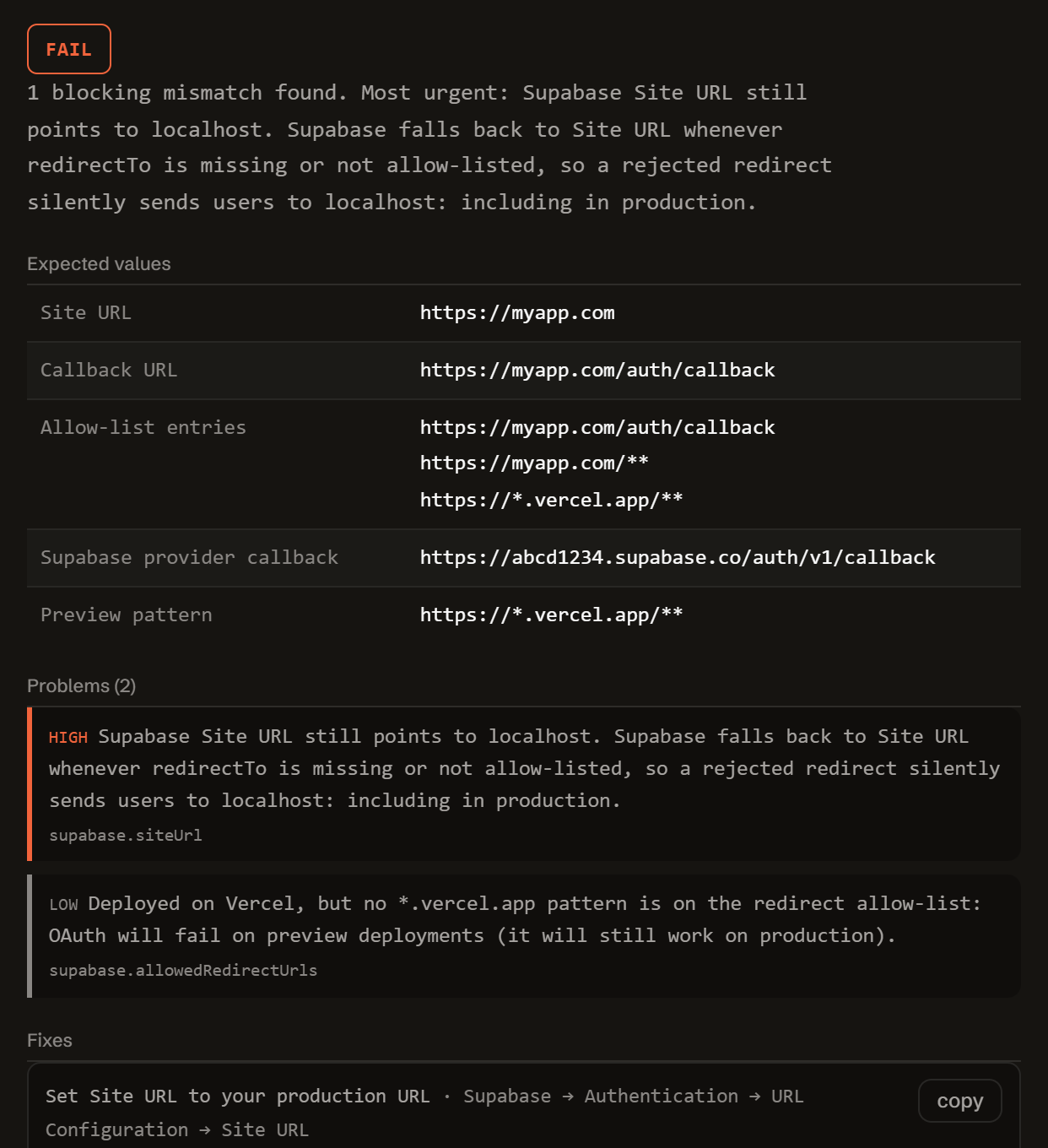
  "expected":   { siteUrl, callbackUrl, allowListEntries, supabaseCallback, previewPattern },
  "problems":   [ { severity, code, message, where } ],
  "fixes":      [ { title, value, where } ],
  "checklist":  [ "..." ],
  "disclaimer": "..."
}
Everything runs client-side. The form above calls this exact function in your browser. There is no backend, no API key, and no request that carries your config anywhere.
It checks the callback URL your app will actually use against your Supabase redirect allow-list, glob-matched the same way Supabase matches it, your Site URL, and the exact callback your OAuth provider console expects.
Open and free. Found a case it gets wrong? Open a GitHub issue. No ads, and no tracking beyond anonymous usage counts.
Free.
No account, no payment, no usage limit. This started as a tool I needed myself, so it stays free for the people already using it.
Tell me when a new tool lands. New tools only. No newsletter, no sharing. Reply to any mail to be removed.
Thanks. You will hear from us only when something new is live.
Could not save. Write to andrej@arling.sk.
Read-only, client-side analysis. Nothing you enter is sent anywhere: the check runs entirely in your browser against the values you typed, not your live project. Always verify in your own environment. Not affiliated with Supabase, Vercel, Netlify, Google, GitHub, Microsoft, or Discord.
Questions developers actually search for.
Straight answers to the same redirect questions this tool diagnoses, for when you want the answer without running the checker.
Why does Supabase OAuth redirect to localhost after deploying to Vercel?
Supabase falls back to your project's Site URL whenever the redirectTo value your code sends doesn't exactly match an entry on the Redirect URLs allow-list. If Site URL was never changed from its default of http://localhost:3000, any request that fails that check (a missing entry, a trailing slash, http vs https) lands back on localhost even though the app is live on Vercel.
What should Site URL be in Supabase for a Next.js app?
Site URL should be your app's canonical production origin, for example https://app.example.com, with no trailing slash and no path. It is the fallback Supabase uses whenever redirectTo doesn't match the allow-list, so leaving it at the default localhost value after deploying is what causes production sign-in to bounce back to localhost.
Which redirect URL do I add to Supabase for Vercel preview deployments?
Add a wildcard allow-list entry such as https://*.vercel.app/** alongside your production URL, since every preview deployment gets its own subdomain that a single hardcoded entry won't match. Without a wildcard pattern, OAuth on preview branches keeps falling back to Site URL even though production works fine.
Do I need exchangeCodeForSession in my /auth/callback route?
Yes, if your app uses the PKCE flow, which is the default for @supabase/ssr. The provider redirects back with a ?code= query parameter, and your callback route must call exchangeCodeForSession(code) server-side to exchange it for a session. Without that call, the code sits unused in the URL and the user is never actually signed in.
What redirect URI goes into the Google Cloud console for Supabase?
Google Cloud Console, and any other OAuth provider console, needs Supabase's own callback URL, https://<your-project-ref>.supabase.co/auth/v1/callback, not your app's domain or your /auth/callback route. Supabase is the OAuth client that talks to Google directly; your app's callback route only ever receives the redirect from Supabase afterward.
Why does process?.env.NEXT_PUBLIC_SITE_URL break my redirectTo?
Next.js inlines NEXT_PUBLIC_* variables at build time by statically matching the literal process.env.NEXT_PUBLIC_SITE_URL expression in your source code. Optional chaining, as in process?.env?.NEXT_PUBLIC_SITE_URL, doesn't match that pattern, so the bundler can't inline it. In the browser bundle it silently evaluates to undefined instead of your URL, sending redirectTo down the Site URL fallback path instead of your real domain.
One person in Bratislava, and a lot of automation.
ARLing is run by ARLing s. r. o.. AI agents write most of the code and this page; Andrej decides which problems are worth a tool and answers people. Found a case this tool gets wrong? Write to andrej@arling.sk or open a GitHub issue with your config.
Building an Expo or React Native app instead?
The sibling tool covers Expo Go, development builds, and standalone apps with Supabase Auth: Redirect Doctor for Expo and Supabase. Or see the full index of ARLing tools.
Who publishes this and how it works.
- Publisher
- ARLing s. r. o., Ivanská cesta 32E, 821 04 Bratislava, Slovakia. Company number 56583486, VAT ID SK2122352100.
- Who makes it
- Written and maintained by one person in Bratislava. The source is public on GitHub.
- Payment and delivery
- Nothing is paid for and nothing is unlocked. The answer appears in the page as soon as the check runs.
- Sample and terms
- The tool opens with a worked example, so you can see a real result before you paste your own.
- Reply
- We answer andrej@arling.sk within 24 hours.
- What it is not
- We are not the vendor whose error you are chasing. The tool reads what you paste and names the rule; it changes nothing on your side.