Expo and Supabase Redirect DoctorTools for workARLing s. r. o., Bratislava
See why the OAuth redirect never comes back.
Paste your Expo and Supabase redirect config and get the exact mismatch and the value to change, before you lose another afternoon to it.
Diagnose your config Source code on GitHub
- Free
- Every check and every finding, with no account and no limit.
- Paid
- Nothing. This tool has no paid version and no sign-up.
- Limits
- Expo and Supabase redirect URIs, web and native, checked against the rules both vendors document.
- Your data
- Nothing leaves your browser. There is no backend of ours behind this page.
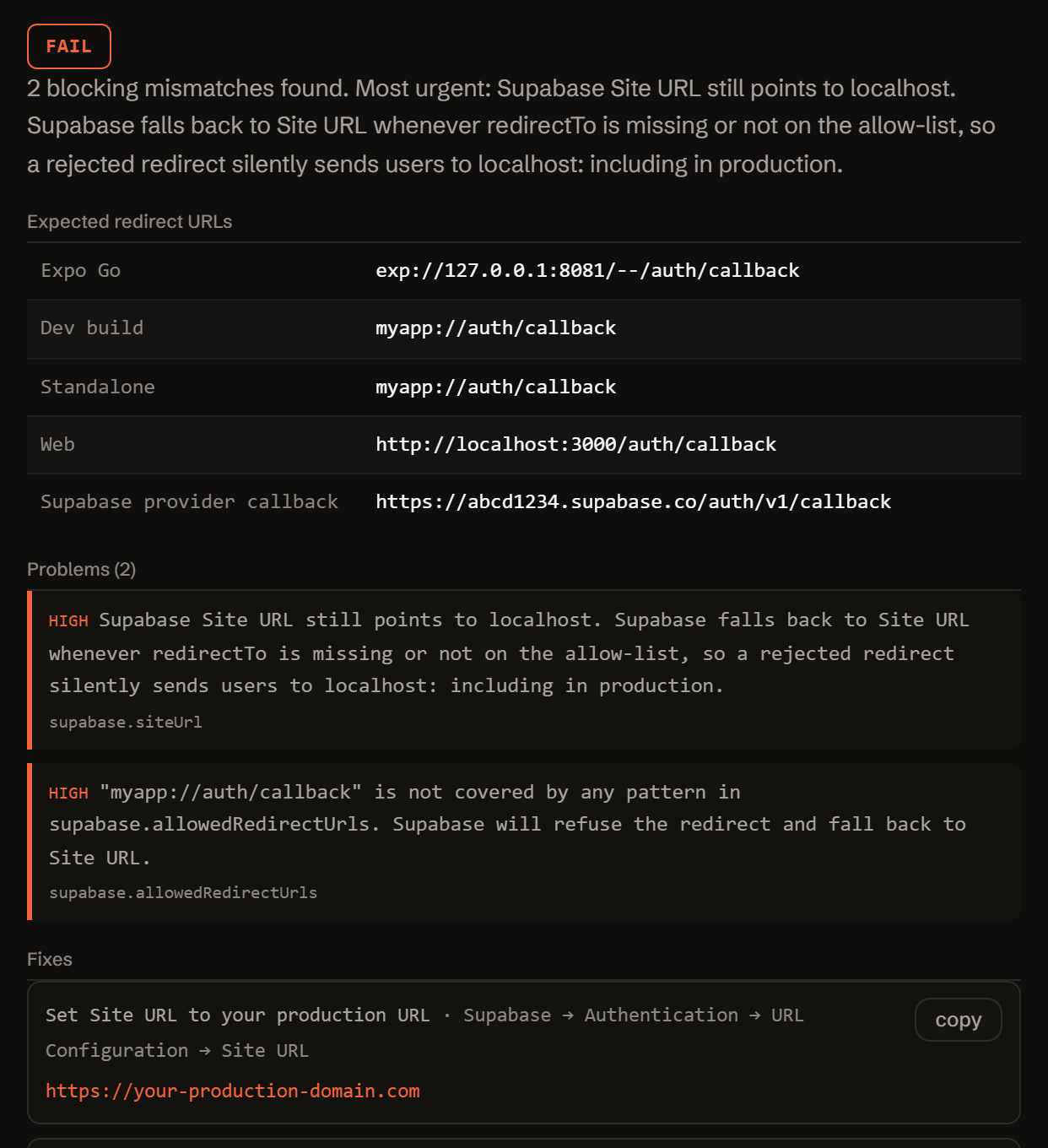
Fill in your config. Get the exact mismatches.
Nothing you type is sent anywhere. The check runs in your browser, using the same rules Expo and Supabase document.
Three reasons your OAuth flow is silently broken.
Every Expo and Supabase team hits the same three walls. None show up in the docs, because they only break when all three configs disagree at once.
-
Redirects to
localhost, even in production.Supabase falls back to its
Site URLwhenredirectTois missing or rejected, and that Site URL still sayshttp://localhost:3000because nobody changed it. -
Expo Go, dev builds, and standalone all produce different URLs.
exp://127.0.0.1:8081/--/...in Expo Go,myapp://...in a dev build, a custom scheme in TestFlight. One config never covers all three. -
Supabase, Expo scheme, and the provider console disagree.
The provider console wants the Supabase callback. Supabase wants your app scheme on its allow-list. Expo wants its dev URL. Miss one and the redirect dies, usually after the user already typed their password.
One function. Config in, diagnosis out.
No server, no SDK key, no signup. doctor.js is plain JavaScript: read it, fork it, or call it directly from your own scripts or CI.
import { diagnose } from './doctor.js';
// or, loaded globally: const { diagnose } = window.RedirectDoctor;

const result = diagnose({
  expo:     { scheme, path, runtime, lanIp, port },
  supabase: { projectUrl, siteUrl, allowedRedirectUrls },
  provider: { name, authorizedRedirectUris },
  code:     { redirectTo, flowType, skipBrowserRedirect, ... },
});

// result
{
  "status":            "fail" | "warn" | "pass",
  "summary":           "...",
  "expectedRedirects": { expoGo, devBuild, standalone, web, supabaseCallback },
  "problems":          [ { severity, code, message, where } ],
  "fixes":             [ { title, value, where } ],
  "checklist":         [ "..." ],
  "disclaimer":        "..."
}
Everything runs client-side. The form above calls this exact function in your browser. There is no backend, no API key, and no request that carries your config anywhere.
It checks the redirect URL each Expo runtime actually produces against your app.json scheme, your Supabase redirect allow-list (glob-matched the same way Supabase matches it), and the exact callback your OAuth provider console expects.
Found a case it gets wrong? Open a GitHub issue. No ads, no tracking beyond anonymous usage counts.
Read-only, client-side analysis. Nothing you enter is sent anywhere: the check runs entirely in your browser against the values you typed, not your live project. Always verify in your own environment. Not affiliated with Expo, Supabase, Google, or Apple.
Free.
This started as a tool I needed myself, so it stays free: no signup, no payment, no rate limit.
Tell me when a new tool lands. New tools only. No newsletter, no sharing. Reply to any mail to be removed.
Thanks. You will hear from us only when something new is live.
Could not save. Write to andrej@arling.sk.
What people actually search for.
Answers to the questions this tool exists to solve, the same rules the checker above runs, in plain language.
Why does Supabase OAuth redirect to localhost in my Expo app?
Supabase falls back to your project's Site URL whenever redirectTo is missing, empty, or not covered by the redirect allow-list. If Site URL is still set to something like http://localhost:3000 (a common default nobody changes after setup), a rejected redirect sends the user there silently, including in production. Fix it by setting Site URL to your real production URL and making sure redirectTo is on the allow-list.
What redirect URL should I add to Supabase for Expo Go?
Expo Go doesn't use your app's custom scheme. It uses exp://127.0.0.1:8081/--/<path> (or your machine's LAN IP instead of 127.0.0.1 when testing on a physical device). Add that exact exp:// URL, or a pattern that covers it, to Supabase's redirect allow-list separately from the scheme://** entry you add for dev and standalone builds.
Do I need exchangeCodeForSession with Expo and Supabase?
Yes, if you're using flowType: 'pkce', the recommended flow for native apps. The redirect callback carries a code query parameter, not a session. You must call supabase.auth.exchangeCodeForSession(url) in your deep-link handler to turn that code into an actual session.
What redirect URI do I add in Google Cloud Console for Supabase OAuth?
Add the exact Supabase auth callback URL: https://<your-project-ref>.supabase.co/auth/v1/callback. OAuth providers require an exact string match here (wildcards aren't accepted), so this same URL, not your app's custom scheme, is what goes in Google Cloud Console, the Apple Services ID's Return URLs, or a GitHub OAuth App's Authorization callback URL.
Why do I get redirect_uri_mismatch between my Expo dev build and standalone app?
Dev builds and standalone builds both resolve to the same scheme://path formula: there's no separate "standalone" URL shape. A mismatch here almost always means the scheme registered in app.json doesn't match what's on the Supabase allow-list or what redirectTo actually builds, not a real difference between the two build types.
Should skipBrowserRedirect be true on native with Supabase signInWithOAuth?
Yes. On native, skipBrowserRedirect: true stops Supabase from trying to issue its own browser redirect. Instead you take the returned URL and open it yourself (for example with expo-web-browser), which is what lets the OAuth flow return correctly to your app's custom scheme.
Who publishes this and how it works.
- Publisher
- ARLing s. r. o., Ivanská cesta 32E, 821 04 Bratislava, Slovakia. Company number 56583486, VAT ID SK2122352100.
- Who makes it
- Written and maintained by one person in Bratislava. The source is public on GitHub.
- Payment and delivery
- Nothing is paid for and nothing is unlocked. The answer appears in the page as soon as the check runs.
- Sample and terms
- The tool opens with a worked example, so you can see a real result before you paste your own.
- Reply
- We answer andrej@arling.sk within 24 hours.
- What it is not
- We are not affiliated with Expo or Supabase. The tool reads what you paste and names the rule; it changes nothing on your side.