camt.053 to ExcelTools for workARLing s. r. o., Bratislava
Bank statement XML (camt.053) to a spreadsheet in seconds.
Upload or paste the camt.053 statement you downloaded from your bank’s internet banking, and download a CSV or Excel table with dates, amounts, the counterparty and payment reference. Nothing is uploaded, no account needed.
Convert a statement Source code on GitHub
Video, 2 minutes (in German): bank statement to Excel
- Free
- Conversion of the whole statement, totals and the balance check with no limit on rows; the table on screen shows the first 200. No account.
- Paid
- €9 a month or €79 a year for Pro, which adds history and several files at once.
- Limits
- 4 banks (Tatra banka, SLSP, VÚB, ČSOB), 2 camt.053 versions (.001.02 and .001.08), a file up to 20 MB. Behind it, 546 automated tests.
- Your data
- Nothing is uploaded anywhere. The statement is read and converted in your browser.
Three reasons an accountant needs a table from the statement, not just a PDF.
camt.053 XML holds all the data a PDF statement only prints on paper. The problem is you can’t double-click an XML file open in Excel.
-
The payment reference isn’t in one field.
A bank writes it into
EndToEndId, into a structured reference, or only into the free-text message, depending on how the payer entered it. The tool tries all three places in that order, so matching against an invoice works even when the PDF shows only one long reference number. -
The sign decides the total, not a colour in a PDF.
The amount is written into the table signed by
CdtDbtInd(DBIT negative, CRDT positive), so the column can be summed directly and checked against the opening and closing balance the statement itself reports. -
One bank entry can hold several payments.
A batched entry with several
NtryDtls/TxDtlsblocks is split into a separate row for each payment, so matching by reference works at the payment level, not the bank-entry level.
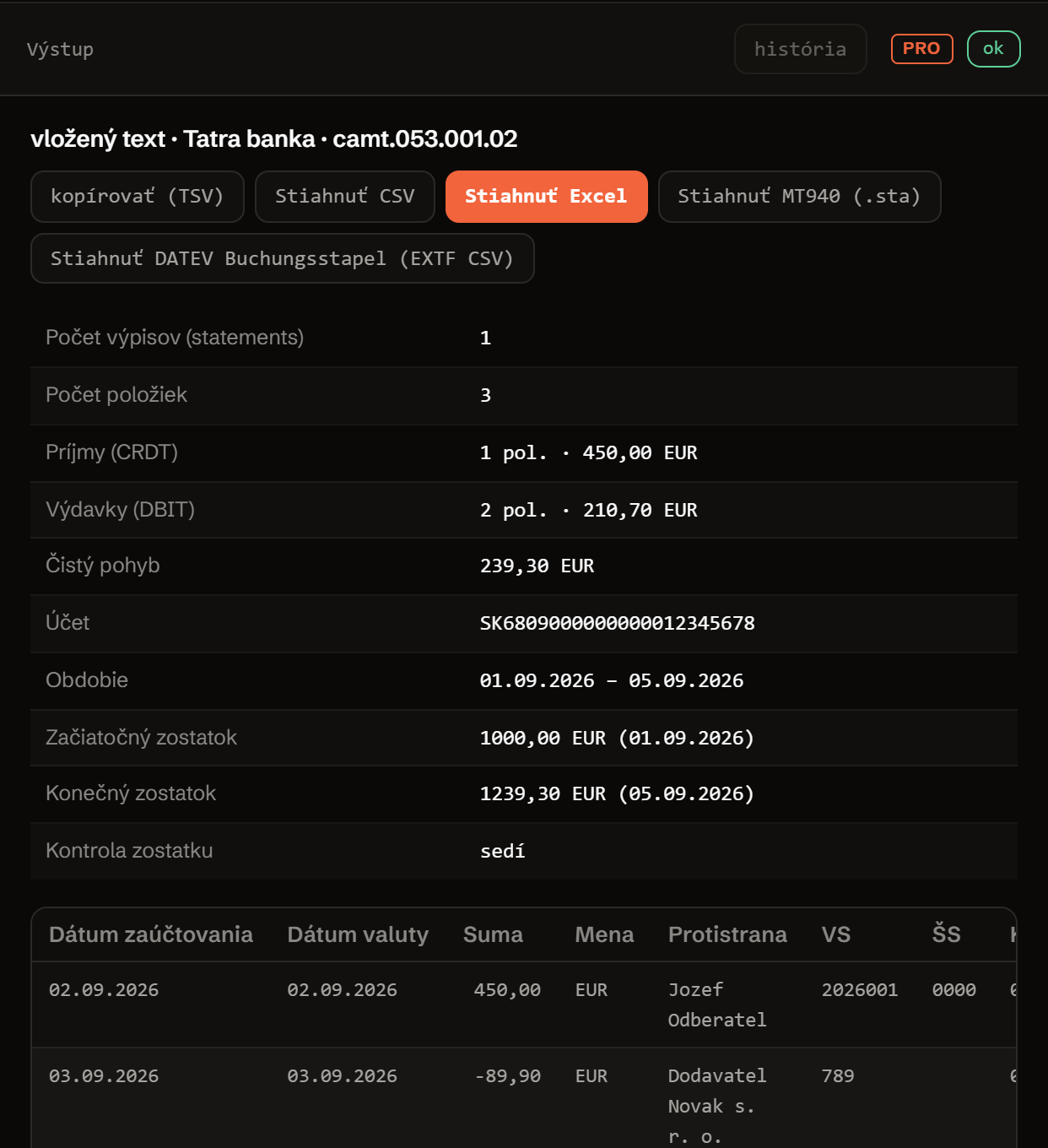
Upload a statement. You get a table, a summary, and a balance check.
Nothing you upload or paste is sent anywhere. Parsing and building the CSV/Excel both run in your browser.
Here for MT940/DATEV? Upload a statement or click “sample”, then “Convert”, then use the “MT940” or “DATEV” button next to the result below.
Used by the DATEV Buchungsstapel (EXTF CSV) export below, next to the result. Setting these is free; downloading the file itself is Pro.
upload or paste a statement, press Convert or ⌘↵
Two functions. XML in, rows out, checked against the balance right away.
No server, no API key, no sign-up. camt053.js is plain JavaScript: read it, fork it, or run it in your own code or CI.
import { parse, toRows, toCsv, summarize } from './camt053.js';
// or globally: const { parse, toRows, toCsv, summarize } = window.CamtConverter;

const parsed  = parse(xmlText);          // camt.053.001.02 or .001.08
const rows    = toRows(parsed);          // 1 row = 1 payment (reference, amount, counterparty...)
const csv     = toCsv(rows, { delimiter: ';', bom: true });
const summary = summarize(parsed);       // OPBD + movements =? CLBD

// Excel with no library: a minimal .xlsx as a ZIP (STORED), see xlsx-writer.js
import { buildXlsx } from './xlsx-writer.js';
Parsing the XML, computing the summary, and building the CSV/Excel run exactly as the form above calls them, in your browser. There is no backend or API key that could carry your statement’s content anywhere else.
The engine uses its own tolerant XML parser (the same approach as the sibling tool SEPA pain.001 Doctor), not DOMParser, so it also runs unmodified in Node: exactly what this project’s own test suite, tests.mjs, runs.
Free, open, no ads, and no tracking beyond anonymous usage counts. If the tool gets a case wrong, please report it as an issue on GitHub.
This tool is not affiliated with any bank and is not a bank itself. The balance check flags a mismatch, but it does not guarantee a statement is complete.
Pro: MT940 and DATEV Buchungsstapel, several files at once.
Converting the whole statement is free and needs no account: you see the totals, the balance check and the table on screen (the first 200 rows of a longer statement). Without a licence the download gives you the first 20 rows with a visible sample header. With a licence you download the whole file as CSV and Excel, plus an MT940 export and a DATEV Buchungsstapel (EXTF CSV) export, processing several files at once, and a conversion history, with one licence shared across three ARLing banking tools.
Converting the whole statement and the balance check, free.
-
MT940 and DATEV Buchungsstapel export.
MT940 was removed from German banks' rulebook in November 2025; many banks already deliver only camt.053. DATEV Kanzlei-Rechnungswesen still has no direct camt.053 file import though: its manual file import still expects MT940. Pro also adds an export straight into the DATEV Buchungsstapel (EXTF CSV) format.
-
Several files at once.
Upload several statements at once and process them in one step instead of one by one. Without Pro, only the first file is processed.
-
Conversion history.
The most recently processed statements (name, date, bank, entry count) stored in your browser, available via the “history” button by the output.
-
Priority email support.
A question, or a case the tool got wrong? A priority reply, directly from the tool’s author.
One licence for three tools. Pro for camt.053 to Excel is activated by the same licence as SEPA pain.001 Generator and Payment matcher: €9/month or €79/year for all three, VAT included. Stripe processes the payment through Managed Payments; Link (Sold through Link, LLC) sends you the receipt and the invoice. SEPA pain.001 Doctor is free and needs no licence.
- MT940 (.sta) and DATEV Buchungsstapel (EXTF CSV) export
- Several files at once, conversion history in the browser
- One licence key for three tools: camt.053 to Excel, SEPA pain.001 Generator, Payment matcher
- Priority email support
Payment via Stripe, VAT included, no minimum term: cancel the subscription at any time in the Stripe customer portal (billing.stripe.com); it stays active until the end of the paid period. You get the licence key on the confirmation page right after payment.
ARLing s. r. o., Bratislava, Slovakia, VAT ID SK2122352100. The conversion runs in your browser, your statement is never uploaded. If the MT940 or DATEV file does not import for you, write to support@arling.sk with the error message, we prioritise fixing it. Terms · Privacy (GDPR)
Free conversion, the whole file with a licence.
Built out of a real need: turn a bank statement into a table without retyping XML by hand. The conversion and the table on screen are free, no account, no limit on statements. Without a licence the download gives you the first 20 rows with a sample header; the whole file is part of the licence.
If it saves you an afternoon, let us know what the tool got wrong. Open an issue on GitHub.
Let me know about a new tool. New tools only. No newsletter, no sharing. Unsubscribe by replying to the email.
Thanks. We’ll only write when there’s something new.
Could not save it. Please write to support@arling.sk.
Need this regularly? Bulk processing, matching against invoices, a connection into your accounting system.
Tell us what you needQuestions people actually search for.
Direct answers about converting a camt.053 statement into a table.
Where in internet banking do I find camt.053?
In German, Austrian and Swiss internet banking, camt.053 (ISO 20022) is the standard electronic statement export, usually next to an older MT940 option, offered by any bank, for example Sparkasse, Volksbank, Deutsche Bank, Commerzbank, Raiffeisen, Erste, UBS or PostFinance. Look under statement export, account statement download, or “camt.053 / ISO 20022”. In Slovak internet banking (Tatra banka, SLSP, VÚB, ČSOB) look for “výpis pre účtovníctvo” or “XML výpis”.
Why is the amount negative?
The amount column carries a sign from CdtDbtInd in the XML: DBIT (money left the account) is written as a negative number, CRDT (money arrived) as a positive one. That lets the column be summed directly and compared against the statement’s own opening and closing balance, which is exactly what the summary above the table does.
Where is the payment reference (VS/SS/KS)?
VS/SS/KS (variabilný/špecifický/konštantný symbol) are Slovak domestic-payment reference numbers; camt.053 has no dedicated field for them. A bank writes them either into EndToEndId as /VS.../SS.../KS..., into a structured reference (RmtInf/Strd/CdtrRefInf/Ref), or only into the free-text message (RmtInf/Ustrd). The tool tries all three places in that order. For a German, Austrian or Swiss statement these columns are usually empty; use the raw message column (RmtInf) instead, which carries the Verwendungszweck text.
Will Excel open it with accented characters intact?
Yes. The downloaded CSV starts with a UTF-8 BOM, which Excel (including German/Austrian/Swiss locales) recognises automatically and displays accented characters correctly without picking an encoding by hand. The .xlsx file is already in the format Excel reads natively as UTF-8, so accented characters are fine there too.
Is my data sent anywhere?
No. Parsing the XML and building the CSV/Excel both run entirely in your browser; the tool has no backend. The only network activity is loading the page’s static files and an anonymous usage counter (Umami), which records only that a conversion happened and how many rows it had, never the statement’s content (IBANs, amounts, names).
Which camt.053 versions are supported?
camt.053.001.02 (namespace urn:iso:std:iso:20022:tech:xsd:camt.053.001.02), what Tatra banka, SLSP, VÚB and ČSOB issue, and the newer camt.053.001.08, more common at banks in Germany, Austria and Switzerland. The tool detects the namespace in the file automatically; the fields it reads (dates, amounts, counterparty, references) are the same in both versions.
What do I get with Pro?
The full-file download as CSV and Excel, an MT940 (.sta) export and a DATEV Buchungsstapel (EXTF CSV) export, processing several files at once, and a history of past conversions stored in your browser. The conversion of the whole statement and the table on screen (first 200 rows) stay free; without a licence the download gives you the first 20 rows as a sample. Pro is activated by one licence from the Banking tools for accountants page, which also works in SEPA pain.001 Generator and Payment matcher. See the Pro section.
Can you also convert camt.053 to MT940 for DATEV?
Yes, as a Pro feature. MT940 was removed from the German banking industry's rulebook in November 2025; many banks already deliver the account statement for accounting only as camt.053. DATEV Kanzlei-Rechnungswesen still has no direct camt.053 file import though: its manual file import still expects MT940 (a paid DATEV Bankdatenservice add-on handles camt.053 a different way). So this tool can convert a statement to MT940 (.sta) for a manual DATEV import or any other legacy software, and also directly to the DATEV Buchungsstapel (EXTF CSV) format. Both exports run in the browser just like the rest of the tool: nothing is uploaded. Check your bank account (Konto) and contra account (Gegenkonto) setup in DATEV before the first import, and test with a small file first: the :86: field convention in MT940 varies slightly bank to bank, and the Buchungstext/Gegenkonto in a DATEV import depend on your own chart of accounts.
Who publishes this and how it works.
- Publisher
- ARLing s. r. o., Ivanská cesta 32E, 821 04 Bratislava, Slovakia. Company number 56583486, VAT ID SK2122352100.
- Who makes it
- Written and maintained by one person in Bratislava. The core
camt053.jsis plain JavaScript and is public on GitHub. - Payment and delivery
- Stripe processes the payment through Managed Payments. The merchant of record is Link (Sold through Link, LLC), which sends you the receipt and the invoice as a PDF; Stripe calculates and remits the VAT. You get the licence key on the confirmation page right after payment.
- Sample and terms
- The sample button loads a worked statement, so you can try the whole tool before paying.
- Reply
- We answer support@arling.sk within 24 hours.
- What it is not
- We are not a bank or an accounting firm. The conversion is about format; the booking stays with you.