Supabase Deep Link DoctorTools for workARLing s. r. o., Bratislava
See why the deep link back from Supabase never arrives.
Paste your Flutter and supabase_flutter OAuth or magic-link deep link config. Get the exact scheme, host and file mismatch, and the value to fix, before it costs you another afternoon.
Diagnose yours Source code on GitHub
- Free
- Every check and every finding, with no account and no limit.
- Paid
- Nothing. This tool has no paid version and no sign-up.
- Limits
- Flutter on iOS and Android, behind 94 automated tests.
- Your data
- Nothing leaves your browser. There is no backend of ours behind this page.
Nothing you type is sent anywhere. The check runs in your browser, using the same allow-list matching rules Supabase documents.
Read-only, client-side analysis. Nothing you enter is sent anywhere: the check runs against the values you type, not your live project. Always verify in your own environment. Not affiliated with Supabase, Google, Apple, GitHub, Discord, Kakao or the Flutter project.
Three reasons your deep link never reaches the app.
Every supabase_flutter team hits the same three walls. Locally they line up by accident. In a release build, on a real device, they don't.
- Three files, one string.
redirectTo, CFBundleURLSchemes, the AndroidManifest intent-filter and the Supabase redirect allow-list are four separate places that must agree on the exact same scheme://host. Miss one and the OS never hands the link back to your app.
- An underscore breaks Google sign-in.
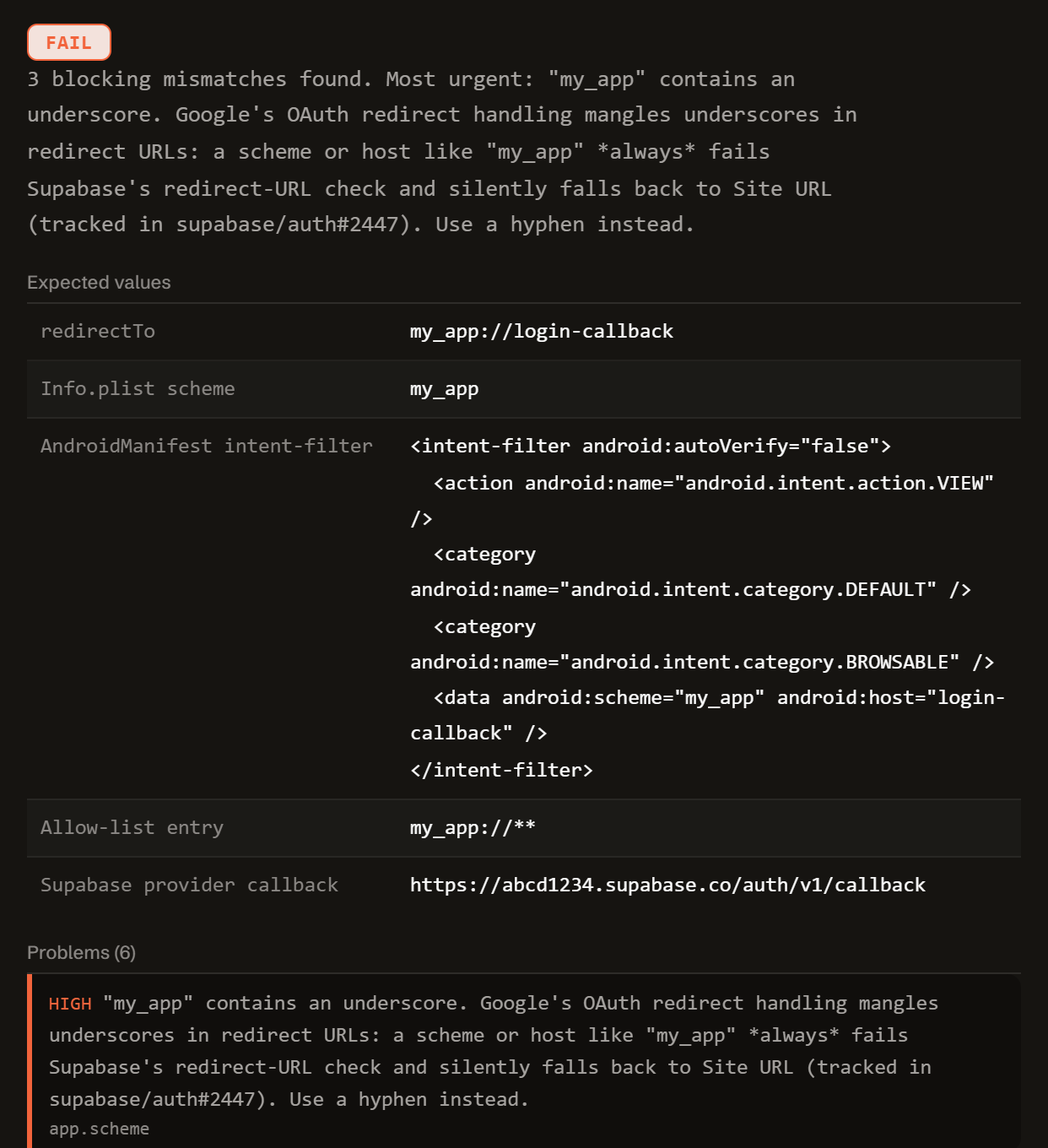
A scheme like my_app://callback looks fine everywhere you check it, until Google's OAuth redirect handling mangles the underscore and Supabase's redirect check always fails (supabase/auth#2447), quietly falling back to Site URL.
- The wrong LaunchMode strands the browser.
LaunchMode.inAppWebView gets detected and blocked by Kakao's, Discord's and Facebook's OAuth screens. Implicit flow puts the session in a URL fragment that deep links don't always preserve. Both leave the user stuck mid-flow.
One function. Config in, diagnosis out.
No server, no SDK key, no signup. doctor-flutter.js is plain JavaScript: read it, fork it, or run it in your own scripts or CI.
import { diagnose } from './doctor-flutter.js';
// or, loaded globally: const { diagnose } = window.RedirectDoctorFlutter;

const result = diagnose({
  app:      { scheme, host, launchMode, authFlowType, iosSchemesInPlist, androidIntentFilter },
  supabase: { projectUrl, siteUrl, allowedRedirectUrls },
  provider: { name, authorizedRedirectUris },
  code:     { redirectTo, usesSkipBrowserRedirect, listensToAuthStateChange },
});

// result
{
  "status":     "fail" | "warn" | "pass",
  "summary":    "...",
  "expected":   { redirectTo, iosPlistScheme, androidIntentFilter, allowListEntry, supabaseCallback },
  "problems":   [ { severity, code, message, where } ],
  "fixes":      [ { title, value, where } ],
  "checklist":  [ "..." ],
  "disclaimer": "..."
}
Everything runs client-side. The form above calls this exact function in your browser. There is no backend, no API key, and no request that carries your config anywhere.
It checks the deep link your app will actually register, computed once from scheme and host, against Info.plist, the AndroidManifest intent-filter, the Supabase redirect allow-list, and the exact callback your OAuth provider console expects.
Free.
No account, no payment, no rate limit. This started as a tool I needed myself. If it saves you an afternoon, tell me what it got wrong: open a GitHub issue.
Tell me when a new tool lands. New tools only. No newsletter, no sharing. Reply to any mail to be removed.
Thanks. You will hear from us only when something new is live.
Could not save. Write to andrej@arling.sk.
Questions developers actually search for.
Straight answers to the same supabase_flutter deep link questions this tool diagnoses, for when you just need the answer, not the checker.
Why doesn't Supabase OAuth redirect back to my Flutter app on Android?
The most common cause is a mismatch between the scheme and host your Dart code sends as redirectTo and the android:scheme and android:host values in the AndroidManifest.xml intent-filter. If they don't match exactly, Android has nothing registered to catch the link. The second cause is an underscore in the scheme: Google's OAuth redirect handling mangles underscores, so a scheme like my_app always fails Supabase's redirect-URL check and falls back to Site URL (tracked in supabase/auth#2447).
What redirectTo should I use with supabase_flutter?
Use the exact scheme://host form documented by Supabase, for example io.supabase.myapp://login-callback, with no trailing slash and no path beyond the host. That same string must appear unchanged in four places: the redirectTo argument, the CFBundleURLSchemes entry in Info.plist, the AndroidManifest intent-filter, and the Supabase redirect allow-list.
Does an underscore in my deep link scheme break Google sign-in?
Yes. Supabase's own auth repository documents this as a known issue, supabase/auth#2447. A redirect URL containing an underscore, such as my_app://callback, is mangled by Google's OAuth handling and always fails Supabase's redirect-URL match, falling back to Site URL instead of returning to the app. Use a hyphen instead, my-app://callback, or a dotted reverse-domain scheme like io.supabase.myapp.
Which LaunchMode should I use for signInWithOAuth in Flutter?
Set authScreenLaunchMode: LaunchMode.externalApplication. It opens the provider's OAuth screen in the system browser, which is what hands control back to the OS to fire your app's custom-scheme intent-filter or CFBundleURLSchemes entry. LaunchMode.inAppWebView embeds a WebView instead, and Kakao, Discord and Facebook among others detect that and either refuse to complete sign-in or never trigger the redirect back out.
What goes into Info.plist and AndroidManifest for Supabase deep links?
In ios/Runner/Info.plist, add a CFBundleURLTypes array containing a dict whose CFBundleURLSchemes array lists your scheme. In android/app/src/main/AndroidManifest.xml, add an intent-filter to your launch activity with action VIEW, categories DEFAULT and BROWSABLE, and a data element with android:scheme and android:host matching your redirectTo exactly. Leave android:autoVerify off: it only does anything for https Android App Links.
What redirect URI do I put in the Google console for supabase_flutter?
Google Cloud Console's "Authorized redirect URIs" field needs Supabase's own callback, https://your-project-ref.supabase.co/auth/v1/callback, never your app's custom scheme. Google redirects to Supabase first at that URL, and only then does Supabase redirect on to your Flutter app's scheme://host. Your app's deep link never goes in the provider console.
Who publishes this and how it works.
- Publisher
- ARLing s. r. o., Ivanská cesta 32E, 821 04 Bratislava, Slovakia. Company number 56583486, VAT ID SK2122352100.
- Who makes it
- Written and maintained by one person in Bratislava. The source is public on GitHub.
- Payment and delivery
- Nothing is paid for and nothing is unlocked. The answer appears in the page as soon as the check runs.
- Sample and terms
- The tool opens with a worked example, so you can see a real result before you paste your own.
- Reply
- We answer andrej@arling.sk within 24 hours.
- What it is not
- We are not the vendor whose error you are chasing. The tool reads what you paste and names the rule; it changes nothing on your side.