Product Feed Doctor:find what is wrong withyour shopping feedbefore Google, Metaor your AI assistant do
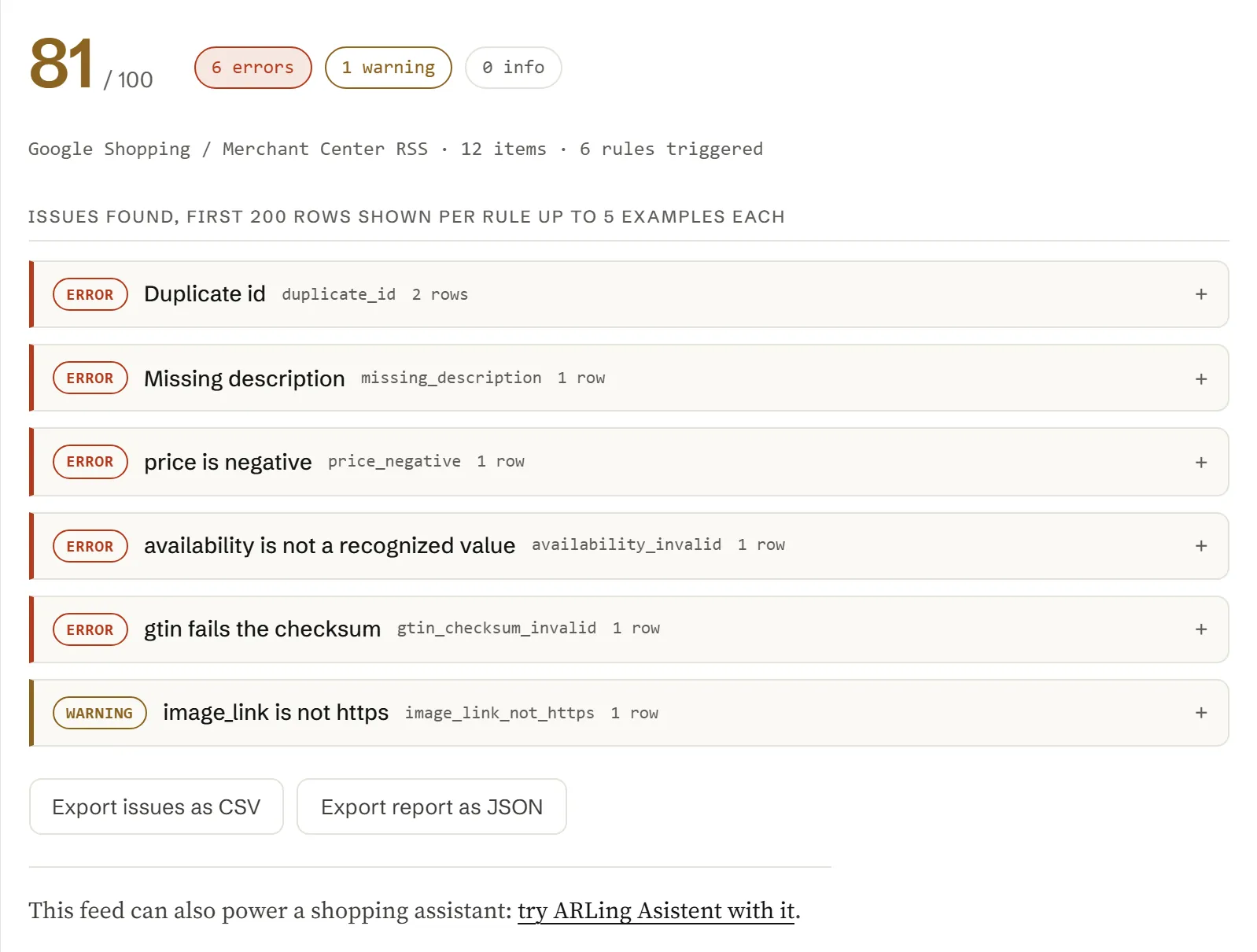
Paste a feed URL, paste the feed content, or upload the file: Google Shopping/Merchant Center RSS, a Facebook/Meta catalog CSV, Shopify's /products.json, WooCommerce's Store API JSON, a generic XML feed, or plain CSV. Get a score out of 100, a rule-by-rule report, and the exact rows to fix, all in your browser.
- 31 rules checked
- 6 feed formats
- 0 €, no account
- nothing is uploaded
Check your feed
Everything below runs in your browser. Paste a feed URL and click Fetch, paste the feed content directly, upload the downloaded file, or load the built-in sample to see how a report looks.
31 rules, each with a severity and a one-line fix.
Every rule below has a stable id, a severity (error, warning or info), and, where it applies, the Merchant Center product data specification field it checks. This table is generated straight from feed-doctor.js, so it never drifts from what the tool actually runs.
| Severity | Rule id | Field | What it checks |
|---|
The six issues that show up in almost every feed.
Most feeds fail on a small, repeating set of mistakes. Here is what causes each one and the fastest way to fix it.
-
HTML left inside description.
Shopify's body_html and WooCommerce's description both carry raw markup. Strip tags before export, or run the field through a plain-text converter; description should read as prose, not markup.
-
Availability written as free text.
"Available", "In Stock!", "2 left" and similar are not recognized. Map your stock status to exactly one of in stock, out of stock, preorder or backorder before export.
-
Price with no currency.
"19.99" alone is ambiguous. Always export price as an amount and an ISO currency code together, e.g. 19.99 USD, and make sure sale_price uses the same currency and is lower than price.
-
A mistyped or copy-pasted GTIN.
A single transposed digit still looks right at a glance but fails the check digit. Re-scan or re-copy the barcode from the product packaging or your supplier's data sheet rather than retyping it by hand.
-
Variants with no size or color.
If item_group_id ties variants together, each row still needs its own size and/or color (or another differentiator), or Google and Meta cannot tell the variants apart in the report or the ad.
-
Duplicate ids after a re-export.
A migration or a re-platforming often reuses ids, or resets them to a row number that collides across categories. id must be unique for the life of the item; if you must reuse a SKU, prefix it per source.
Turn your feed into a shopping assistant
Once your feed is clean, the same product data can power a chat assistant on your store that answers "does this come in blue" or "what's in stock under 30 euro" from your real catalog.
ARLing Asistent reads your product feed and answers customer questions on your store, in your language, without a rewrite of your catalog.
See ARLing AsistentOne function. Feed text in, report out.
No server, no API key, no signup. feed-doctor.js is plain JavaScript: read it, fork it, or run it in your own scripts or CI.
import { analyze } from './feed-doctor.js';
// or, loaded globally: const { analyze } = window.FeedDoctor;

const report = analyze(feedText);

// report
{
  "format":       "google_rss" | "facebook_csv" | "generic_csv"
                | "shopify_json" | "woocommerce_json" | "generic_xml",
  "productCount": 12,
  "score":        0-100,
  "counts":       { error, warning, info },
  "rules":        [ { id, severity, spec, title, count, examples } … ],
  "problems":     // only the triggered rules, sorted by severity
  "issues":       // first 200 individual issues, one row per problem
  "truncated":    true | false
}
Everything runs client-side. The tool above calls this exact function in your browser. There is no backend, no API key, and no request that carries your feed anywhere (fetching a URL you paste is the one exception: your browser calls that URL directly).
It detects the format from the content itself, normalizes every row to one product shape (id, title, description, link, image_link, price, currency, availability, brand, gtin, mpn, condition, google_product_category, item_group_id, sale_price, shipping), and runs all 31 rules against every row.
Free.
No account, no payment, no usage limit: it runs as a static page in your browser, so there is no server to bill for.
Tell me when a new tool lands. New tools only. No newsletter, no sharing. Reply to any mail to be removed.
Thanks. You will hear from us only when something new is live.
Could not save. Write to support@arling.sk.
Questions people actually search for.
Straight answers to the same product feed questions this tool checks, for when you just need the answer, not the checker.
Which feed formats does Product Feed Doctor support?
Google Shopping / Merchant Center RSS 2.0 (the g: namespace format, with or without an atom:link tag), a Facebook/Meta catalog CSV, a Shopify /products.json export, a WooCommerce Store API JSON response, a generic XML feed built from repeating <item> elements with different tag names, and a plain CSV with a header row. The format is auto-detected from the content you paste, upload, or fetch; you never have to tell it which one you're using.
Does this tool upload my feed or product data anywhere?
No. Parsing and every check run entirely in your browser, in feed-doctor.js. If you paste a feed URL and click Fetch, your browser fetches that URL directly; the response never passes through any ARLing server. Pasted text, an uploaded file, and the report are never sent anywhere. Read feed-doctor.js directly, or check your browser's Network tab, to verify.
Why does fetching my feed URL directly fail?
Most shop platforms and CDNs do not send the Access-Control-Allow-Origin header on their feed URLs, since those files are meant to be downloaded by Google's or Meta's servers, not read by JavaScript running on a different website. When that happens, the browser blocks the response before this page ever sees it: that is normal CORS behavior, not a bug in this tool. Paste the feed content instead, or upload the downloaded file; both skip the browser fetch entirely and analyze the exact same content.
What counts as a required field in a Google Shopping feed?
The Merchant Center product data specification treats id, title, description, link, image_link, price a availability as required for essentially every item, and condition as required once an item is not new (used, refurbished, and similar). This tool flags all of those as errors when missing or blank, and additionally checks brand, gtin, mpn, item_group_id a shipping, which the specification calls for in specific situations (a branded, identifiable product; variants that need to be told apart; and so on).
How is the GTIN checksum validated?
gtin is checked against the standard GS1 mod-10 check-digit algorithm used by GTIN-8, GTIN-12 (UPC-A), GTIN-13 (EAN-13) and GTIN-14: non-digit characters are stripped, the length must be one of those four, and the last digit must equal (10 minus the mod-10 remainder of the weighted sum of the preceding digits, alternating weights 3 and 1 from the right) mod 10. A gtin that is the wrong length, or has a transposed or mistyped digit, fails this check and is flagged with the exact value that was read.
What is the score out of 100 based on?
It is a simple, documented heuristic, not a number Google, Meta or any platform publishes: start at 100, subtract 3 points per error instance, 1 point per warning instance and 0.2 points per info instance found across the whole feed, then floor at 0 and round to the nearest integer. It is meant to give a quick sense of how much is wrong and how severe it is, not to predict feed approval; read the rule-by-rule report for the specifics that matter.
What does Feed Doctor Monitor do?
It is an opt-in add-on: give it your feed URL and e-mail after an analysis, and a server checks the same 31 rules once a week for free and e-mails you when something got worse. Daily feed checks are part of the paid Shop Guard. The checker above stays entirely local to your browser; the monitor is the only part of Feed Doctor that fetches your feed on our server, and it only fetches the URL you gave it.
Is Feed Doctor Monitor free?
Yes, the free plan stays: one feed per e-mail address, a weekly check, and an alert when a new error rule appears or the score drops by 5 points or more. The paid plan is called Shop Guard and costs 9 EUR a month, VAT included. Once a week it checks EU obligations on the public pages of your shop (an online withdrawal function, the legal guarantee notice, generic environmental claims) and the data AI shopping assistants read (price, availability, shipping and returns); if you add your feed, it checks the feed daily and alerts you on every change in the error counts. Cancel any time with one click on the Shop Guard page; the subscription ends at the end of the paid month, no further payment. In the Stripe checkout the item is called Feed Doctor Monitor. It is a technical check, not legal advice. Details: Shop Guard. Free monitor alerts: unsubscribe with one click from any alert e-mail or the monitor page.
What does Feed Doctor Monitor store about my feed?
Your e-mail, the feed URL, and the result of each check: the score, the counts of errors/warnings/infos, and which rule ids triggered. It never stores the feed content itself, so your product titles, prices and descriptions never sit on our server. Shop Guard also stores your shop address and the result of each weekly shop check.