AI shopping assistant for WooCommerce, set up from your store in 10 minutes.
Connect your store from the plugin's settings screen: ARLing Shopping Assistant reads your public WooCommerce Store API product feed and answers shopper questions from your own catalogue, in their language, with links to matching products. Free up to 100 conversations a month, no card.
- 0 conversations stored
- 100 conversations/month free
- WooCommerce 6.0+
- runs on Cloudflare Workers
How to install
The plugin is in the official WordPress plugin directory, so it installs like any other: from wp-admin, no zip to download.
-
Get the plugin.
In wp-admin go to Plugins > Add New Plugin, search "ARLing Shopping Assistant", click Install Now, then Activate. WooCommerce must already be active. You can also read the listing first at wordpress.org/plugins/arling-asistent; the source is on GitHub.
-
Connect your store.
Go to WooCommerce > ARLing Shopping Assistant. Enter a contact e-mail, read exactly what will be sent (your store's public product feed URL, your domain, that e-mail), tick the consent checkbox, and click Connect.
-
Configure and go live.
Wait for the status to show "Ready" (usually a few minutes). Choose a language, colour mode, position, and where the widget should appear, then Save settings. The chat bubble appears on your storefront.
Pricing
Free forever up to 100 conversations a month, no card. Above that, a simple price by monthly conversation volume, billed through Stripe once you go over the free limit.
| Plan | Price | Conversations / month | |
|---|---|---|---|
| Free | €0 | up to 100 | Get the plugin |
| Starter | €19 / month | up to 1,000 | Get the plugin |
| Pro | €39 / month | up to 3,000 | Get the plugin |
Free up to 100 conversations a month, forever, no payment card. Nothing is charged automatically: the plugin keeps working on the free tier until you choose a paid plan from its settings screen. No annual plan yet, monthly billing only.
Before you install
Do you store customer conversations?
No. The content of a conversation is never stored, not by us, not in any database. We only keep daily counters: how many conversations and product-link clicks happened, for billing and the monthly limit.
Do you have a GDPR Article 28 agreement?
Yes. ARLing s. r. o. acts as processor for the messages your store's visitors send. Template agreement: Data Processing Agreement (DPA). The template is written in Slovak; an English translation is available on request at support@arling.sk.
How do I cancel if it does not work out?
Click Disconnect on the plugin's settings screen: the widget stops appearing immediately, no card and no commitment on the free plan. A paid plan above the free limit runs through Stripe and can be cancelled any time.
What if WooCommerce is not active, or my products do not show up?
The plugin needs an active WooCommerce installation: it reads your store's public Store API product feed (/wp-json/wc/store/v1/products). If products do not appear after connecting, use the manual refresh option on the settings screen, or write to support@arling.sk with your store's domain.
What it answers, and what it knows
Built to know as little as possible about your shoppers.
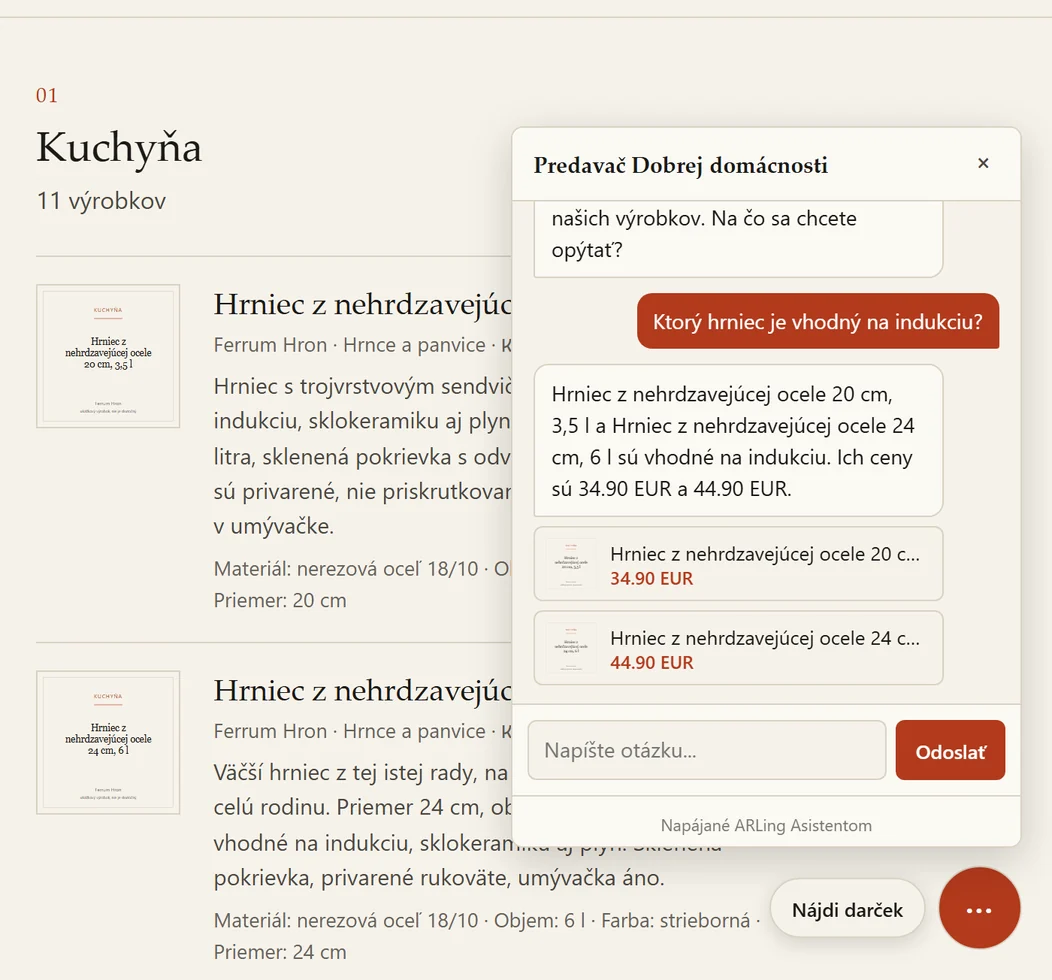
Answers from your catalogue only. Shoppers ask in their own words ("do you have a waterproof jacket under 80 euros?") and the assistant replies using only your own product catalogue, with up to three linked products per answer, in the shopper's language (Slovak, Czech, English or German).
Says so when it does not know. If nothing in your catalogue matches the question, the assistant says that plainly and points to your store's contact e-mail instead of guessing.
Conversations are not stored. Only daily aggregate counters (conversations, product clicks) are kept, to enforce the monthly plan quota, never the message content.
Nothing loads until you connect. The plugin sends nothing to ARLing's servers until you tick the consent checkbox and click Connect on its settings screen.
GDPR Article 28 agreement. ARLing s. r. o. acts as processor for the messages your store's visitors send. Template: Data Processing Agreement (DPA), written in Slovak, English translation on request.
Runs on Cloudflare's global network. Cloudflare does not publicly guarantee EU-only processing location for Workers AI; the DPA relies on Standard Contractual Clauses (SCC) and Cloudflare's EU Cloud Code of Conduct certification.
FAQ
Does this plugin store my customers' conversations?
No. The ARLing Shopping Assistant service does not keep a record of what was asked or answered. It only keeps daily aggregate counters (how many conversations, how many product-link clicks) per store, used solely to enforce the monthly plan quota.
What data leaves my site, and when?
Nothing leaves your site until you explicitly click Connect after ticking the consent checkbox on the plugin's settings screen. At that point, your store's public WooCommerce Store API product feed URL, your site domain, and the contact e-mail you entered are sent once to set up your assistant.
Does this work without WooCommerce?
No. This plugin reads your store's public WooCommerce Store API product feed, so an active WooCommerce installation is required alongside WordPress 6.0 or later.
What does it cost?
Free up to 100 conversations a month, no card needed. Above that, 19 EUR a month up to 1,000 conversations or 39 EUR a month up to 3,000, paid through Stripe. Nothing is charged automatically: the free tier keeps working within its limit until you choose a paid plan.
How do I install it?
In wp-admin go to Plugins > Add New Plugin, search "ARLing Shopping Assistant", click Install Now, then Activate. The plugin is in the official directory at wordpress.org/plugins/arling-asistent; the source is on GitHub.
How do I remove the widget or the plugin entirely?
Click Disconnect on the settings page to immediately stop the widget from appearing on your site, without uninstalling the plugin. Deleting the plugin from the Plugins screen also removes all of its local settings from your database; it does not, by itself, delete your tenant data on ARLing's servers, see the Data Processing Agreement for how to request that.
Want an e-mail when new features land in the WooCommerce plugin?
Thanks, we'll be in touch.
Something went wrong, please try again or write to support@arling.sk.
Download the plugin, connect your store, free up to 100 conversations a month.
Get the plugin