AI nákupný asistent pre WooCommerce, nastavíte si ho priamo v e-shope za 10 minút.
E-shop pripojíte na stránke s nastaveniami pluginu: ARLing Asistent načíta váš verejný produktový feed z WooCommerce Store API a odpovedá na otázky zákazníkov z vášho vlastného katalógu, v ich jazyku, s odkazmi na zodpovedajúce produkty. Zadarmo do 100 rozhovorov mesačne, bez karty.
- 0 uložených rozhovorov
- 100 rozhovorov/mesiac zadarmo
- WooCommerce 6.0+
- beží na Cloudflare Workers
Ako to nainštalovať
Plugin je v oficiálnom adresári WordPressu, takže sa inštaluje ako každý iný: priamo z wp-admin, bez sťahovania zipu.
-
Stiahnite si plugin.
Vo wp-admin prejdite na Plugins > Add New Plugin, vyhľadajte „ARLing Asistent“, kliknite na Install Now a potom na Activate. WooCommerce už musí byť aktívny. Zápis si môžete najprv prečítať na wordpress.org/plugins/arling-asistent; zdrojový kód je na GitHube.
-
Pripojte svoj e-shop.
Prejdite na WooCommerce > ARLing Asistent. Zadajte kontaktný e-mail, prečítajte si presne, čo sa odošle (URL verejného produktového feedu vášho e-shopu, vaša doména a ten e-mail), zaškrtnite políčko so súhlasom a kliknite na Connect.
-
Nastavte a spustite.
Počkajte, kým sa stav neprepne na „Ready“ (zvyčajne pár minút). Vyberte jazyk, farebný režim, pozíciu a to, kde sa má widget zobrazovať, a kliknite na Save settings. Na vašom e-shope sa objaví chatovacia bublina.
Cenník
Zadarmo navždy do 100 rozhovorov mesačne, bez karty. Nad tento limit jednoduchá cena podľa počtu rozhovorov za mesiac, ktorú účtujeme cez Stripe až vtedy, keď prekročíte bezplatný limit.
| Plán | Cena | Rozhovory / mesiac | |
|---|---|---|---|
| Free | 0 € | do 100 | Stiahnuť plugin |
| Starter | 19 € / mesiac | do 1 000 | Stiahnuť plugin |
| Growth | 39 € / mesiac | do 3 000 | Stiahnuť plugin |
Do 100 rozhovorov mesačne zadarmo, navždy, bez platobnej karty. Nič sa neúčtuje automaticky: plugin beží ďalej na bezplatnom pláne, kým si na stránke s jeho nastaveniami nevyberiete platený plán. Ročné predplatné zatiaľ nie je v ponuke, fakturujeme len mesačne.
Pred inštaláciou
Ukladáte rozhovory zákazníkov?
Nie. Obsah rozhovoru sa nikde neukladá, ani u nás, ani v žiadnej databáze. Ukladáme len denné počítadlá: koľko bolo rozhovorov a koľko kliknutí na odkazy na produkty, kvôli fakturácii a mesačnému limitu.
Máte zmluvu podľa čl. 28 GDPR?
Áno. ARLing s. r. o. je pri spracúvaní správ návštevníkov vášho e-shopu sprostredkovateľom. Vzor zmluvy: Zmluva o spracúvaní osobných údajov (DPA). Vzor je v slovenčine, anglický preklad pošleme na požiadanie, napíšte na podpora@arling.sk.
Ako to zrušiť, keď mi to nesadne?
Na stránke s nastaveniami pluginu kliknite na Disconnect: widget sa okamžite prestane zobrazovať. Pri bezplatnom pláne nepotrebujete kartu ani sa k ničomu neviažete. Platený plán nad bezplatným limitom ide cez Stripe a dá sa kedykoľvek zrušiť.
Čo ak WooCommerce nie je aktívny alebo sa moje produkty nezobrazia?
Plugin potrebuje aktívnu inštaláciu WooCommerce: číta verejný produktový feed vášho e-shopu zo Store API (/wp-json/wc/store/v1/products). Ak sa produkty po pripojení neobjavia, použite na stránke s nastaveniami ručné obnovenie, alebo napíšte na podpora@arling.sk a uveďte doménu svojho e-shopu.
Na čo odpovedá a čo vie
Postavený tak, aby o vašich zákazníkoch vedel čo najmenej.
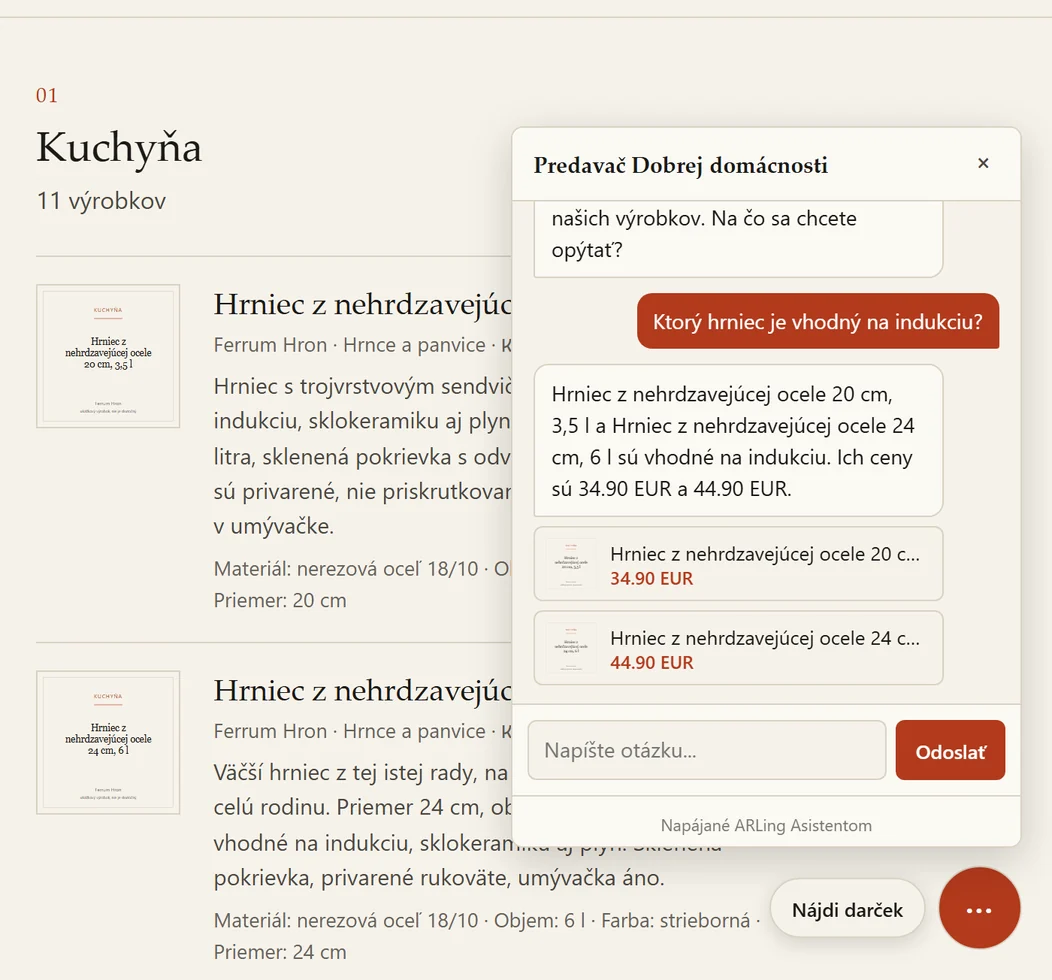
Odpovedá len z vášho katalógu. Zákazníci sa pýtajú vlastnými slovami („máte nepremokavú bundu do 80 eur?“) a asistent odpovedá len z vášho produktového katalógu, s najviac tromi odkazmi na produkty v jednej odpovedi, v jazyku zákazníka (slovenčina, čeština, angličtina alebo nemčina).
Keď nevie, povie to. Ak otázke vo vašom katalógu nič nezodpovedá, asistent to rovno povie a namiesto hádania odkáže na kontaktný e-mail vášho e-shopu.
Rozhovory sa neukladajú. Ukladajú sa len denné súhrnné počítadlá (rozhovory, kliknutia na produkty), kvôli mesačnému limitu plánu, nikdy nie obsah správ.
Kým e-shop nepripojíte, nenačíta sa nič. Plugin neodošle na servery ARLingu nič, kým na stránke s jeho nastaveniami nezaškrtnete políčko so súhlasom a nekliknete na Connect.
Zmluva podľa čl. 28 GDPR. ARLing s. r. o. je pri spracúvaní správ návštevníkov vášho e-shopu sprostredkovateľom. Vzor: Zmluva o spracúvaní osobných údajov (DPA), v slovenčine, anglický preklad na vyžiadanie.
Beží na globálnej sieti Cloudflare. Cloudflare verejne negarantuje, že Workers AI spracúva údaje výlučne v EÚ. DPA sa preto opiera o štandardné zmluvné doložky (SCC) a certifikáciu Cloudflare podľa EU Cloud Code of Conduct.
Otázky
Ukladá tento plugin rozhovory mojich zákazníkov?
Nie. Služba ARLing Asistent si neuchováva záznam o tom, na čo sa zákazník pýtal ani čo mu asistent odpovedal. Uchováva len denné súhrnné počítadlá za e-shop (koľko rozhovorov, koľko kliknutí na odkazy na produkty), a to výlučne kvôli mesačnému limitu plánu.
Aké údaje odchádzajú z môjho webu a kedy?
Z vášho webu neodíde nič, kým na stránke s nastaveniami pluginu nezaškrtnete políčko so súhlasom a výslovne nekliknete na Connect. Vtedy sa jednorazovo odošle URL verejného produktového feedu vášho e-shopu z WooCommerce Store API, doména vášho webu a kontaktný e-mail, ktorý ste zadali, aby sme vám asistenta nastavili.
Funguje to aj bez WooCommerce?
Nie. Plugin číta verejný produktový feed vášho e-shopu z WooCommerce Store API, takže okrem WordPressu 6.0 alebo novšieho potrebujete aj aktívnu inštaláciu WooCommerce.
Koľko to stojí?
Do 100 rozhovorov mesačne zadarmo, bez platobnej karty. Nad tento limit 19 EUR mesačne do 1 000 rozhovorov alebo 39 EUR mesačne do 3 000, platba cez Stripe. Nič sa neúčtuje automaticky: bezplatný plán beží ďalej v rámci svojho limitu, kým si nevyberiete platený plán.
Ako ho nainštalujem?
Vo wp-admin prejdite na Plugins > Add New Plugin, vyhľadajte „ARLing Asistent“, kliknite na Install Now a potom na Activate. Plugin je v oficiálnom adresári na wordpress.org/plugins/arling-asistent; zdrojový kód je na GitHube.
Ako odstránim widget alebo celý plugin?
Kliknite na Disconnect na stránke s nastaveniami a widget sa okamžite prestane zobrazovať na vašom webe, bez odinštalovania pluginu. Zmazanie pluginu na stránke Plugins odstráni aj všetky jeho lokálne nastavenia z vašej databázy. Údaje vášho účtu na serveroch ARLingu tým však nezmažete. Ako o ich zmazanie požiadať, nájdete v Zmluve o spracúvaní osobných údajov.
Chcete e-mail, keď pribudnú nové funkcie pluginu pre WooCommerce?
Ďakujeme, ozveme sa.
Niečo sa pokazilo, skúste to prosím znova alebo napíšte na podpora@arling.sk.
Stiahnite si plugin, pripojte e-shop, zadarmo do 100 rozhovorov mesačne.
Stiahnuť plugin