AI nákupný asistent pre Shopify, widget pridáte za pár minút.
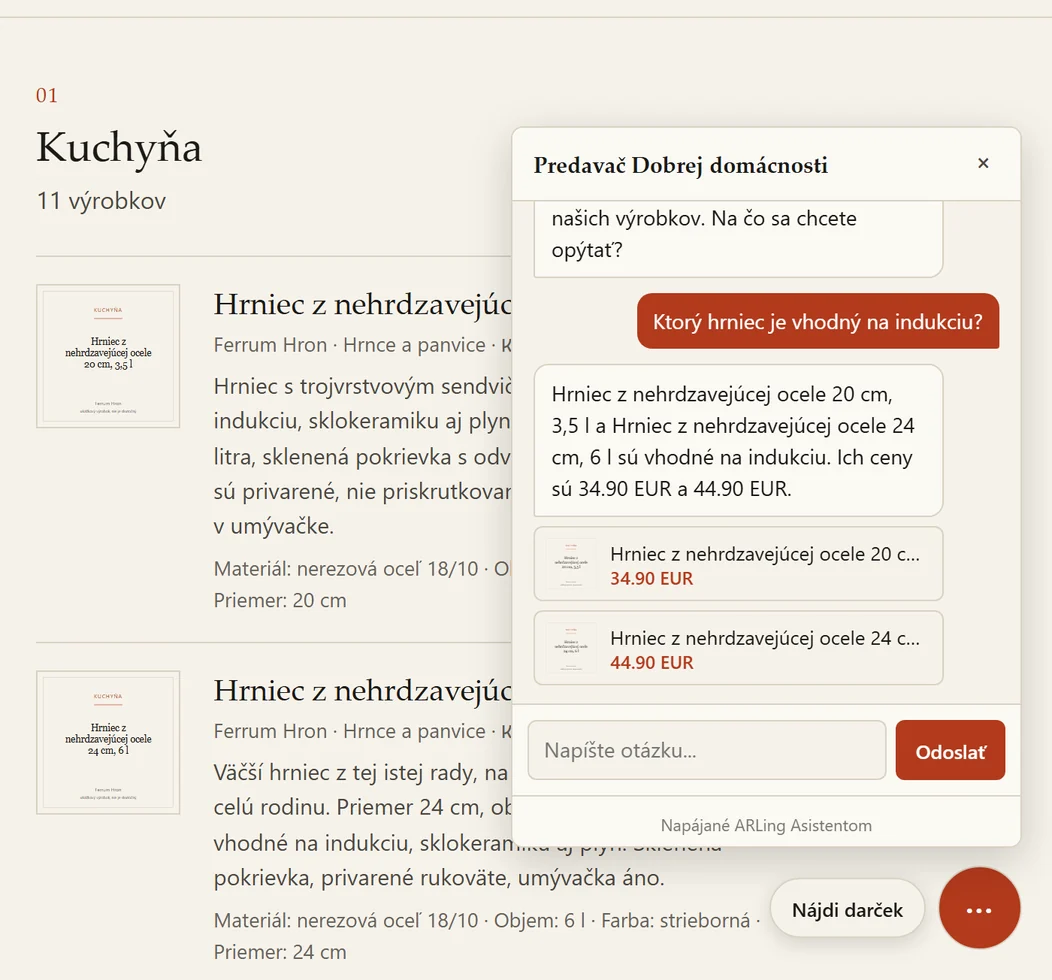
Na Shopify sa pridáva jedným script tagom v šablóne, appku v Shopify App Store nemáme. Vypýtajte si tenant ID cez skúšobný formulár na hlavnej stránke a pridajte do šablóny jeden script tag: asistent už teraz číta verejný feed /products.json vášho e-shopu a odpovedá zákazníkom z vášho skutočného katalógu. Zadarmo do 100 konverzácií mesačne, bez platobnej karty.
- 0 uložených konverzácií
- 100 konverzácií/mesiac zadarmo
- číta priamo
/products.json - beží na Cloudflare Workers
Ako ho pridať dnes
Na rovinu: appku v Shopify App Store nemáme a v pláne teraz nie je. Widget sa pridáva jedným script tagom priamo v šablóne, je pod ním ten istý asistent ako všade inde.
-
Vypýtajte si tenant ID.
Vyplňte skúšobný formulár na hlavnej stránke ARLing Asistenta a zadajte URL feedu svojho e-shopu (
https://your-store.myshopify.com/products.json) a svoj e-mail. Priamo na tej stránke uvidíte, ako asistent funguje naživo, a dostanete tenant ID pre svoj e-shop. -
Pridajte widget do šablóny.
V administrácii Shopify prejdite na Online Store > Themes > Edit code, otvorte
theme.liquida nižšie uvedený script tag vložte tesne pred</body>, pričomTENANT_IDnahraďte ID z prvého kroku.
Script tag, ktorý pridáte pred </body> v súbore theme.liquid:
<script src="https://arling-asistent.arling.workers.dev/widget.js"
        data-tenant="TENANT_ID"
        data-lang="en"
        data-color="auto"
        defer></script>
Cenník
Do 100 konverzácií mesačne navždy zadarmo, bez platobnej karty. Nad tento limit platí jednoduchá cena podľa mesačného počtu konverzácií, účtovaná cez Stripe až vtedy, keď bezplatný limit prekročíte.
| Plán | Cena | Konverzácie / mesiac | |
|---|---|---|---|
| Free | 0 € | do 100 | Pozrite, ako ho pridať |
| Starter | 19 € / mesiac | do 1 000 | Pozrite, ako ho pridať |
| Growth | 39 € / mesiac | do 3 000 | Pozrite, ako ho pridať |
Do 100 konverzácií mesačne zadarmo, navždy a bez platobnej karty. Nič sa neúčtuje automaticky: asistent ďalej beží v bezplatnom pláne, kým sami nepožiadate o prechod na platený plán. Ročný plán zatiaľ nie je, fakturuje sa iba mesačne.
Skôr než ho pridáte
Ukladáte konverzácie so zákazníkmi?
Nie. Obsah konverzácie sa nikdy neukladá, ani u nás, ani v žiadnej databáze. Držíme len denné počítadlá: koľko bolo konverzácií a koľko kliknutí na produktové odkazy, kvôli fakturácii a mesačnému limitu.
Máte zmluvu podľa článku 28 GDPR?
Áno. ARLing s. r. o. vystupuje ako sprostredkovateľ pri správach, ktoré posielajú návštevníci vášho e-shopu. Vzorová zmluva: Zmluva o spracúvaní osobných údajov (DPA). Vzor je napísaný po slovensky, anglický preklad pošleme na požiadanie na podpora@arling.sk.
Ako to zruším, ak sa to neosvedčí?
Odstráňte script tag zo súboru theme.liquid a widget sa okamžite prestane zobrazovať. Pri bezplatnom pláne nie je karta ani žiadny záväzok. Platený plán nad bezplatný limit ide cez Stripe a zrušíte ho kedykoľvek.
Čo ak nechcem zasahovať do kódu šablóny?
Zatiaľ to inak nejde: appku v Shopify App Store nemáme, jediný spôsob je úprava jedného riadka v súbore theme.liquid.
Na čo odpovedá a čo vie
Postavený tak, aby o vašich zákazníkoch vedel čo najmenej.
Odpovedá len z vášho katalógu. Zákazníci sa pýtajú vlastnými slovami („máte nepremokavú bundu do 80 eur?“) a asistent odpovedá výlučne z vášho katalógu
/products.json, s najviac tromi odkazmi na produkty v jednej odpovedi, v jazyku zákazníka (po slovensky, česky, anglicky alebo nemecky).Keď nevie, povie to. Ak otázke nezodpovedá nič z vášho katalógu, asistent to priamo povie a namiesto hádania odkáže na kontaktný e-mail vášho e-shopu.
Konverzácie sa neukladajú. Držíme len denné súhrnné počítadlá (konverzácie, kliknutia na produkty), aby sme ustrážili mesačný limit plánu. Obsah správ neukladáme nikdy.
Používame len verejné dáta z feedu. Pri nastavení tenanta použijeme verejný feed
/products.jsonvášho e-shopu (dáta, ktoré Shopify aj tak posiela do prehliadača každého návštevníka), vašu doménu a e-mail, ktorý zadáte v skúšobnom formulári. Údaje o zákazníkoch ani objednávkach nečítame.Zmluva podľa článku 28 GDPR. ARLing s. r. o. vystupuje ako sprostredkovateľ pri správach, ktoré posielajú návštevníci vášho e-shopu. Vzor: Zmluva o spracúvaní osobných údajov (DPA), v slovenčine, anglický preklad na požiadanie.
Beží na globálnej sieti Cloudflare. Cloudflare pri Workers AI verejne negarantuje spracovanie výlučne v EÚ; zmluva DPA sa opiera o štandardné zmluvné doložky (SCC) a certifikáciu Cloudflare podľa EU Cloud Code of Conduct.
Otázky
Existuje aplikácia pre Shopify?
Nie. V Shopify App Store appku ARLing nemáme a v pláne teraz nie je. Na Shopify sa asistent pridáva rovnako ako na ktoromkoľvek inom e-shope: jedným script tagom v šablóne (theme.liquid).
Ako ho pridám na Shopify?
Vyplňte skúšobný formulár na hlavnej stránke ARLing Asistenta a zadajte URL produktového feedu svojho e-shopu (https://your-store.myshopify.com/products.json) a svoj e-mail, aby ste dostali tenant ID. Potom pridajte do šablóny script tag widgetu s týmto tenant ID, tesne pred uzatváraciu značku </body> v súbore theme.liquid.
Číta môj produktový katalóg automaticky?
Áno. Číta verejný feed /products.json vášho e-shopu, ten istý endpoint, ktorý Shopify aj tak posiela do prehliadača každého návštevníka, a raz denne si ho automaticky obnoví.
Ukladáte konverzácie so zákazníkmi?
Nie. Obsah konverzácií neukladáme nikdy, držíme len denné súhrnné počítadlá (konverzácie, kliknutia na produkty), ktorými strážime mesačný limit plánu.
Aké dáta odchádzajú z môjho e-shopu?
Len dáta z vášho verejného produktového feedu, doména vášho e-shopu a e-mailová adresa, ktorú zadáte v skúšobnom formulári, keď žiadate o tenant ID. Údaje o zákazníkoch ani objednávkach neposielame.
Chcete e-mail, keď pribudnú nové funkcie ARLing Asistenta pre Shopify?
Ďakujeme, ozveme sa.
Niečo sa pokazilo, skúste to znova alebo napíšte na podpora@arling.sk.
Vypýtajte si tenant ID cez skúšobný formulár, pridajte jeden script tag, do 100 konverzácií mesačne zadarmo.
Pozrite, ako ho pridať