Excel spreadsheet, on Etsy
Kids Chore Chart and Allowance Tracker Spreadsheet for Excel
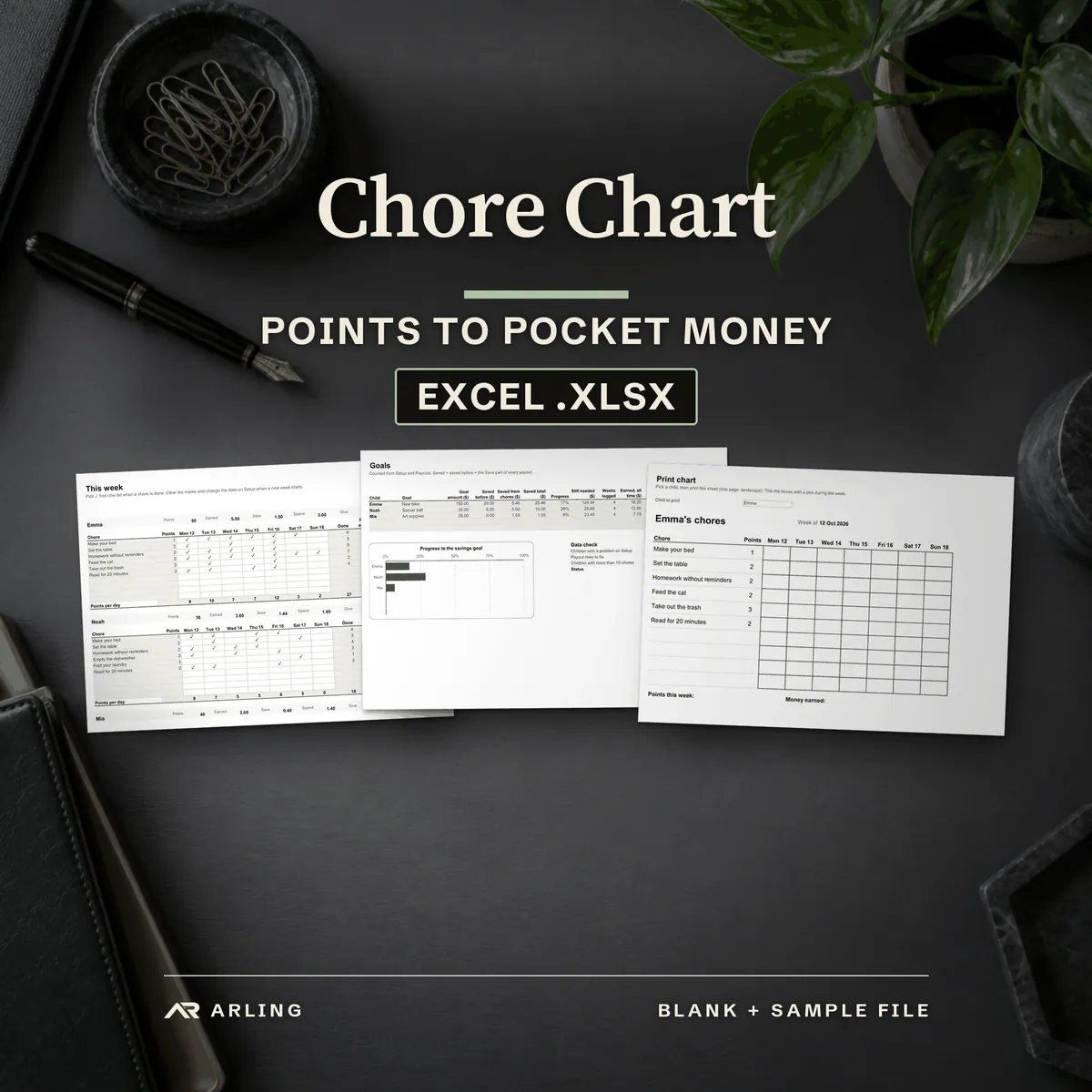
A chore chart and allowance tracker for Excel. Chores earn points, points turn into pocket money, and the money splits into Save, Spend and Give, with a savings goal for each child.
4.90 €
The Excel file (.xlsx) and a copy with sample data, plus a quick start guide PDF in A4 and US Letter. Works in Microsoft Excel 2016 or newer (tested on Windows). A digital download from Etsy: nothing is shipped.
Buy on Etsy, 4.90 €Etsy handles the payment and the instant download. Etsy may show the price in your currency and add tax for your country; it shows the final total before you pay.
Pictures
A closer look before you buy.
These are the pictures from the Etsy listing, in the same order. Click or tap a picture to open it larger.
AI was used to create the background scene of the listing images. The spreadsheet, its formulas and texts were built with the help of AI tools and then checked in Microsoft Excel.
What you get
The spreadsheet, a sample copy and a guide.
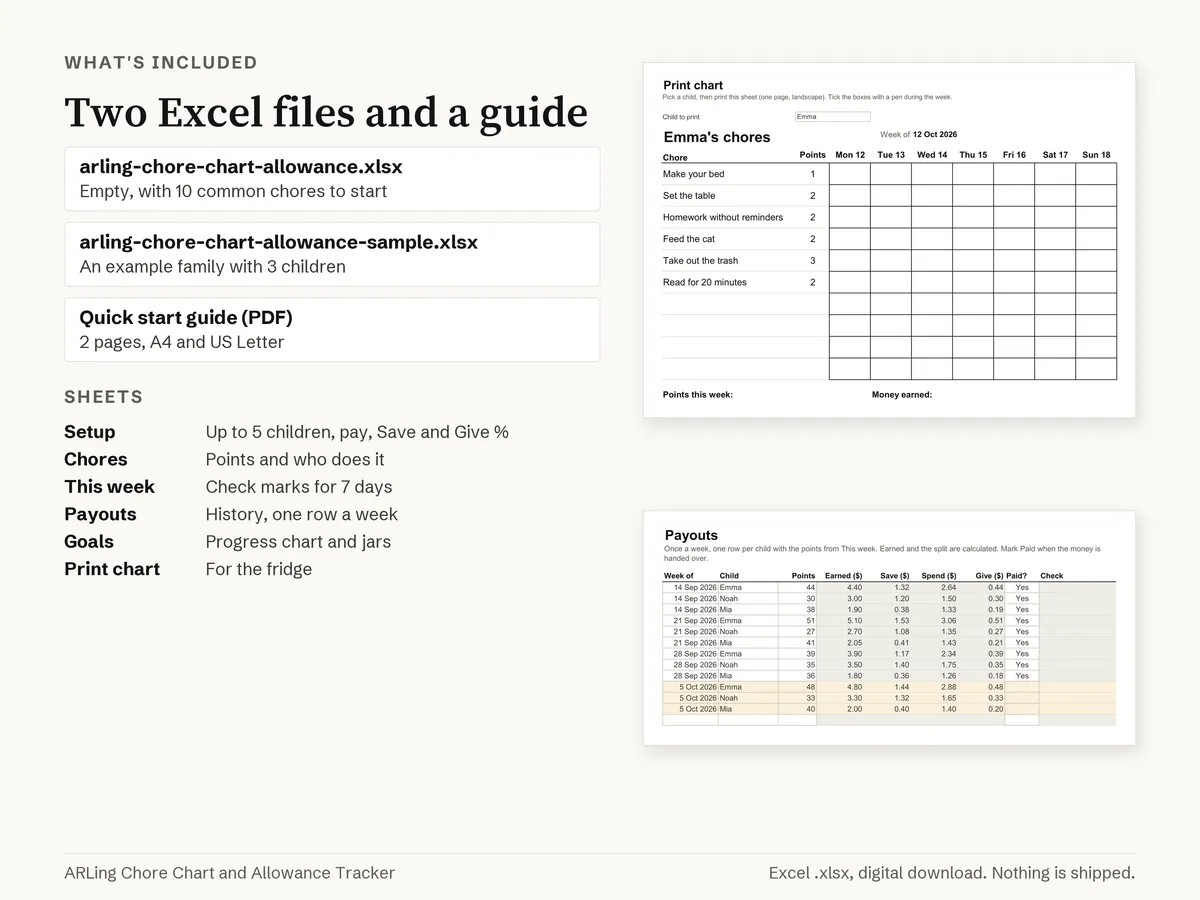
- arling-chore-chart-allowance.xlsx: the empty file, with 10 common chores filled in to start
- arling-chore-chart-allowance-sample.xlsx: the same file with sample data, so you can see every sheet working first
- Quick start guide, PDF, 2 pages, in A4 and in US Letter size
Plain files, no ZIP.
- Paper sizes: A4 and US Letter (the guide).
- Files: Excel .xlsx and PDF.
- Digital download: nothing is shipped by post. The files are in Purchases and reviews on Etsy.com after payment.
Details
7 sheets
- Start here: the steps, with a link to every sheet
- Setup: Currency, week start date, up to 5 children with pay per point, Save %, Give %, goal and saved before.
- Chores: Up to 40 chores with points and who does them.
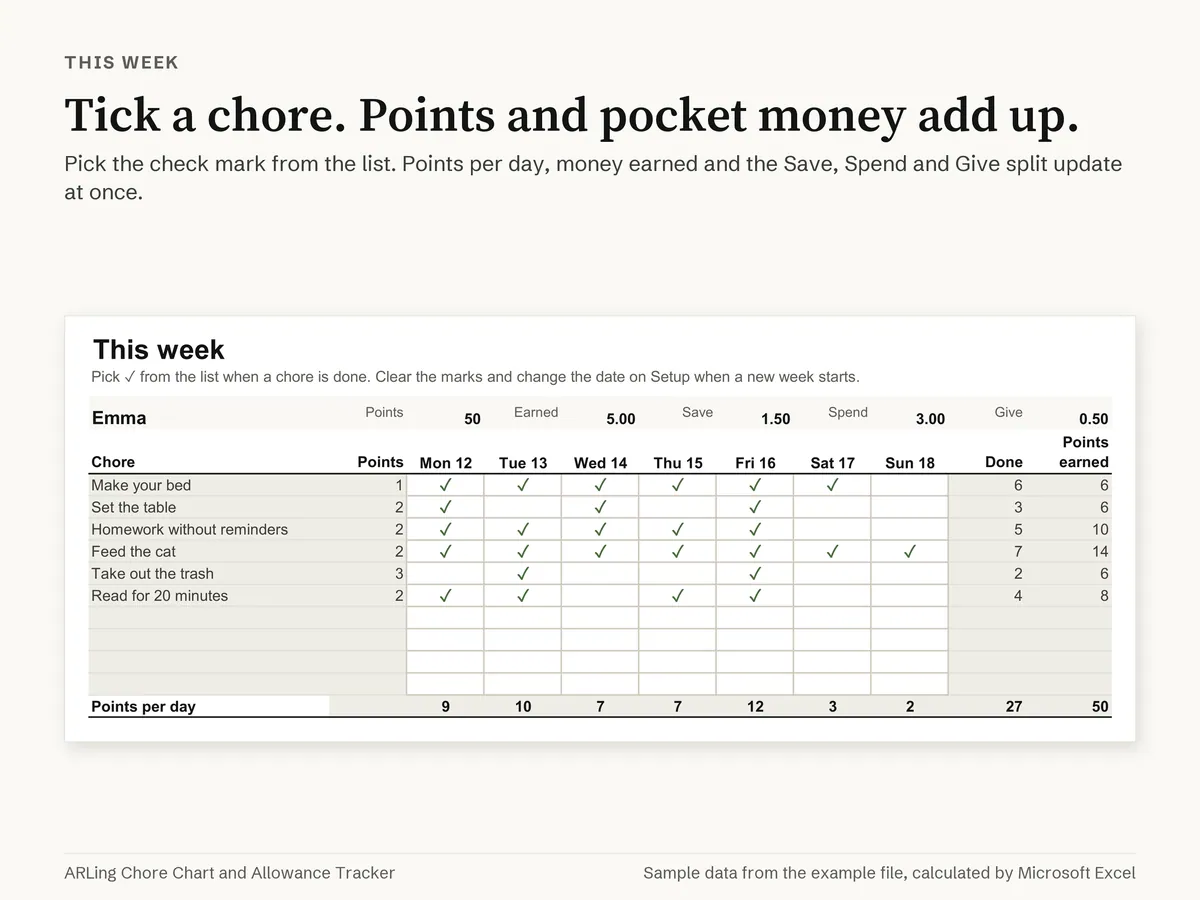
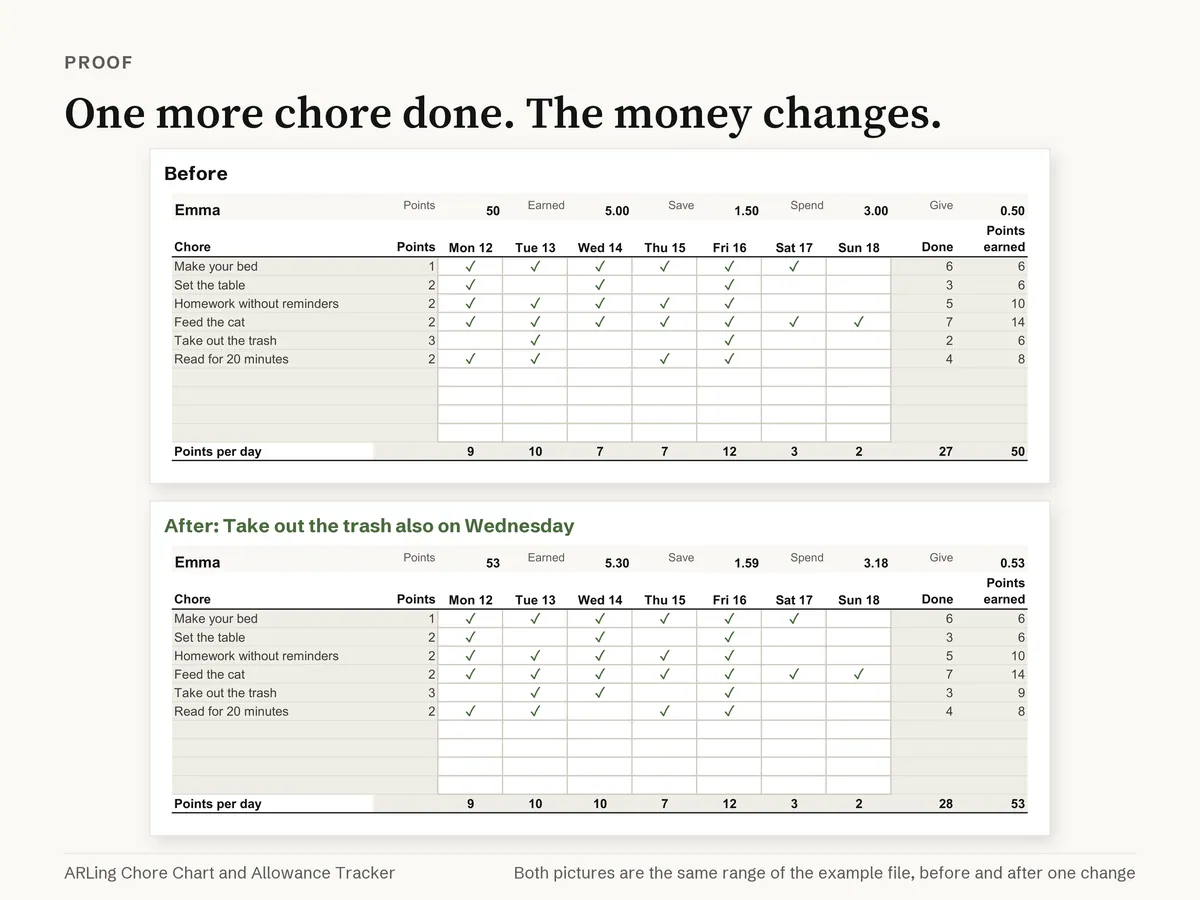
- This week: A block for each child: chores, 7 day columns with ✓, points per day, points, money and the split.
- Payouts: Up to 260 rows (5 children for a year): week, child, points, money, Save, Spend, Give, Paid.
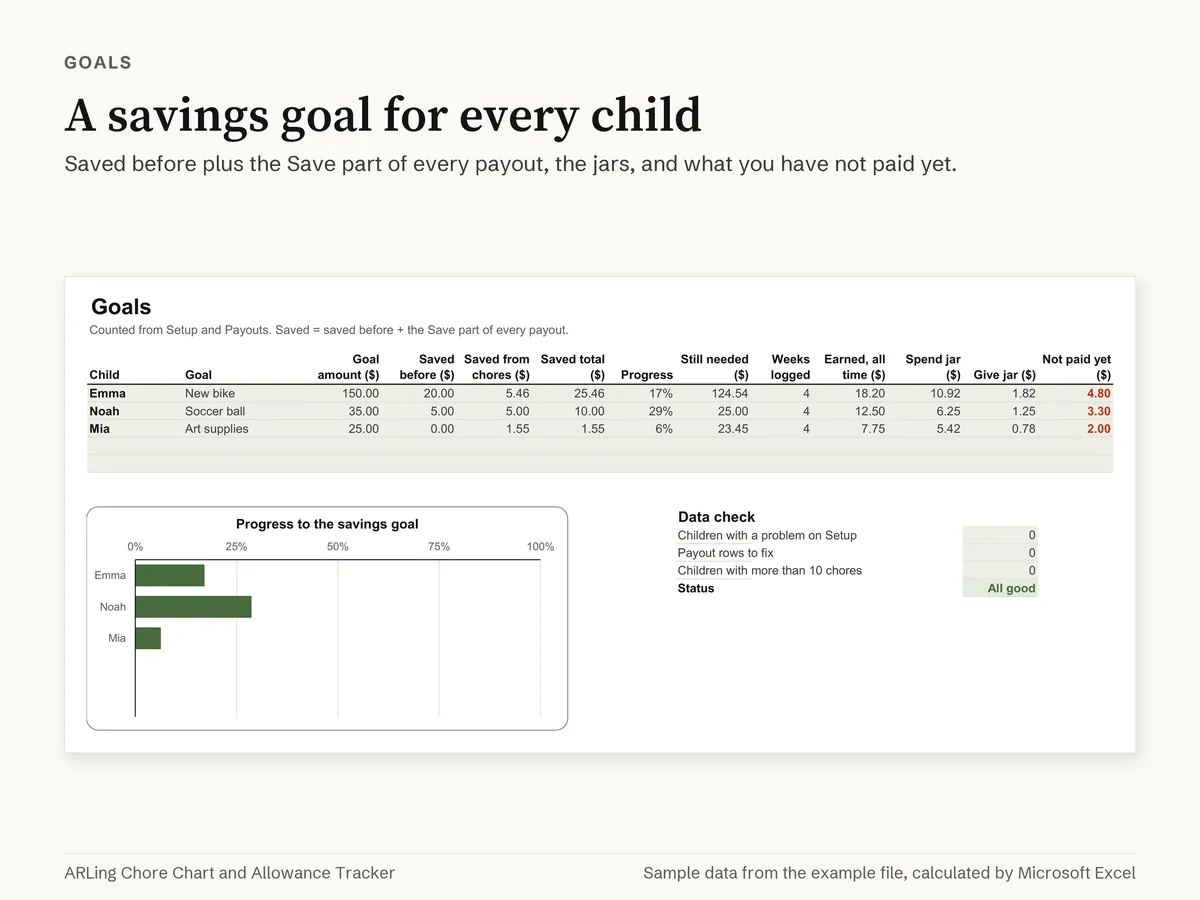
- Goals: Savings goal progress with a chart, money in each jar, unpaid money and a Data check.
- Print chart: One child's chores with empty boxes for each day, big text for the fridge.
How it works
- Up to 5 children, each with pay per point, Save % and Give %; Spend is the rest.
- Chores go to one child or to Everyone. Each child gets up to 10 chores on This week, with a column for each day.
- Pick the check mark from a list. Points per day, points, money and the Save, Spend and Give split are calculated at once.
- Payouts keeps the history (one row per child per week). Goals shows saved so far, progress with a chart, the jars and what is not paid yet.
- Print chart: pick a child and print one landscape page with big text and empty boxes for the fridge.
Works in
Microsoft Excel 2016 or newer (tested on Windows). No macros, no add ins, no account. Not tested: Excel for Mac, Excel for the web, Google Sheets, Apple Numbers, phone and tablet apps.
How we test it
Before release both files are opened, recalculated and saved in Microsoft Excel. The sample file has 1,962 formula cells and none shows an error; 1,620 calculated cells were compared with a separate calculation written in Python and all matched, in the sample file and in the empty file. The pictures in this listing are printed from the sample file by Excel.
Good to know
- This week is a working sheet: clear the check marks when a new week starts and change the date on Setup.
- It is a tracker for parents. It does not move real money.
- Text and labels are in English. Dates show as 26 Nov 2026.
- For your own home or business use. Please do not share or resell the file.
- Questions or a problem with the file: send us an Etsy Message and we will help.
Questions
Before you buy.
How do I get the files?
No physical item is shipped. After Etsy confirms payment, download your files from Purchases and reviews on Etsy.com in a web browser; downloads are unavailable in the Etsy app. Guest buyers can use the download link in their Etsy receipt email.
Which files do I get?
Four files: arling-chore-chart-allowance.xlsx, arling-chore-chart-allowance-sample.xlsx, ARLing-Chore-Chart-and-Allowance-Tracker-Quick-start-A4.pdf and ARLing-Chore-Chart-and-Allowance-Tracker-Quick-start-US-Letter.pdf. Works in: Microsoft Excel 2016 or newer (tested on Windows).
What if a file does not open or print?
Send us an Etsy Message with your order number and the file name, and we will help. Please never send card or payment details.
More printables
More to print.
- Christmas Gift List and Budget Spreadsheet for Excel
Excel spreadsheet, 4.90 € on Etsy.
- Meal Planner and Grocery List Spreadsheet for Excel
Excel spreadsheet, 4.90 € on Etsy.
- Subscription Tracker Spreadsheet for Excel
Excel spreadsheet, 4.90 € on Etsy.
Buy on Etsy, 4.90 € All printables
Content and support: ARLing s. r. o., Company ID 56583486, Bratislava, Slovakia. For a file or printing problem, send an Etsy Message with your order number and the file name.