Universal Links DoctorTools for workARLing s. r. o., Bratislava
See why your link opens the browser, not the app.
Paste your Expo or React Native iOS Universal Links and Android App Links config: associatedDomains, apple-app-site-association, assetlinks.json, intentFilters. Get the exact mismatch and the fix.
Diagnose yours Source code on GitHub
- Free
- Every check and every finding, with no account and no limit.
- Paid
- Nothing. This tool has no paid version and no sign-up.
- Limits
- iOS Universal Links and Android App Links, behind 106 automated tests.
- Your data
- Nothing leaves your browser. There is no backend of ours behind this page.
Nothing you type is sent anywhere. The check runs in your browser, against the same rules Apple's and Android's own verification docs describe.
Read-only, client-side analysis. Nothing you enter is sent anywhere: the check runs entirely in your browser against the values you typed, not your live domain or EAS credentials. Always verify with curl, adb and a real device before shipping. Not affiliated with Apple, Google or Expo.
Three reasons the link opens Safari instead of your app.
Every Expo team hits the same three walls, usually only in a release build, on a real device.
- Wrong associatedDomains format
ios.associatedDomains must be exactly applinks:domain. A stray https:// prefix or trailing path, and iOS never even attempts the Universal Link. No error: it just opens Safari.
- Wrong signing fingerprint
A local debug keystore, an EAS dev-client build and a Google Play App Signing release build each have a different SHA-256 fingerprint. Only the one actually hosted in assetlinks.json verifies.
- Expo Go cannot do it
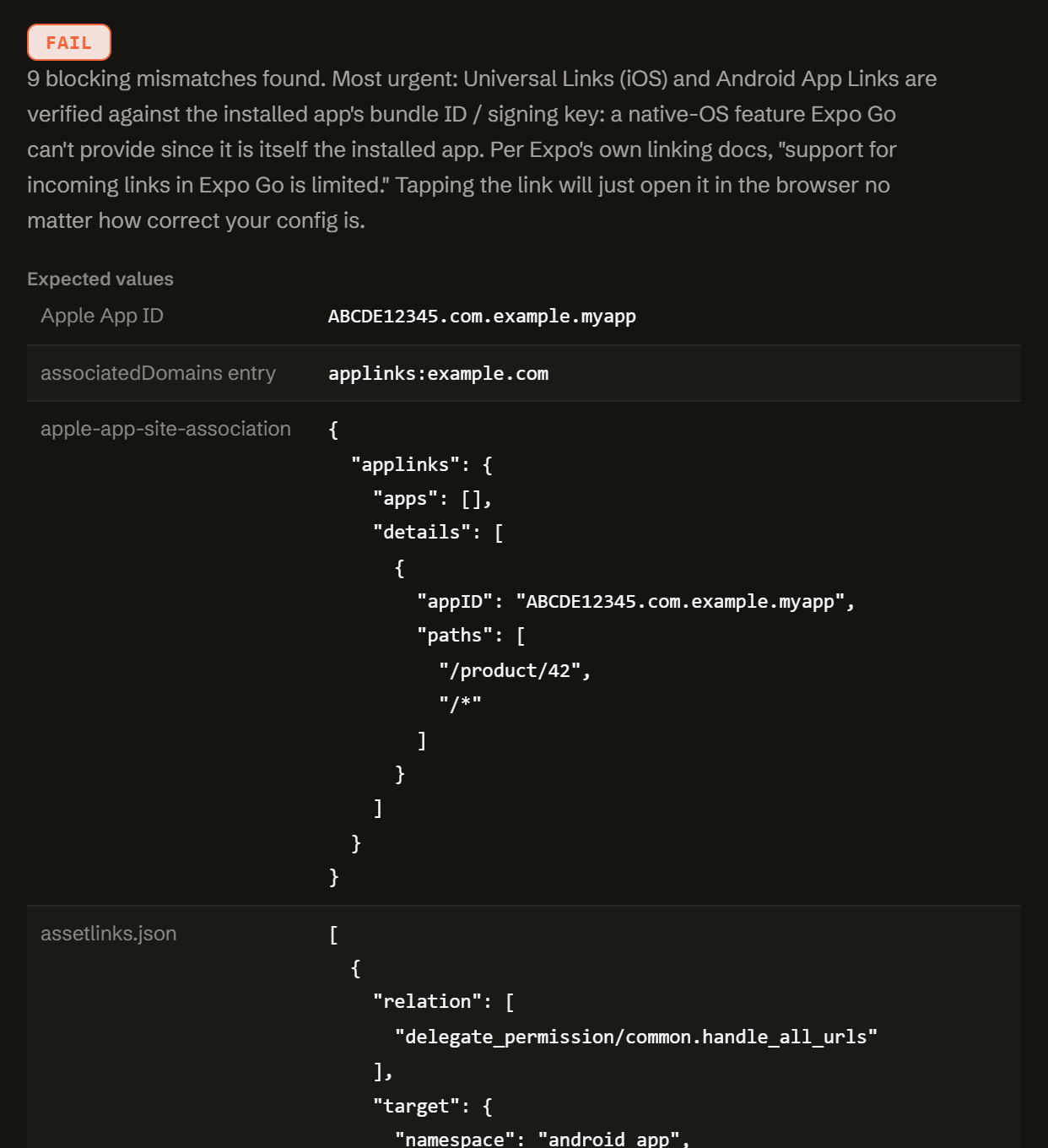
Universal Links and App Links are a native OS feature tied to the installed app's bundle ID and signing key. Expo Go is itself the installed app: you need a development or standalone build to test either one.
One function. Config in, diagnosis out.
No server, no SDK key, no signup. doctor-universal-links.js is plain JavaScript: read it, fork it, or run it in your own scripts or CI.
import { diagnose } from './doctor-universal-links.js';
// or, loaded globally: const { diagnose } = window.UniversalLinksDoctor;

const result = diagnose({
  ios:     { bundleId, teamId, associatedDomains, aasaJson, aasaServedWithRedirect, aasaContentType },
  android: { packageName, sha256Fingerprints, assetlinksJson, intentFilters },
  runtime: 'expo-go' | 'dev-build' | 'standalone' | '',
  linking: { prefixes, usesExpoRouter, testedPath },
});

// result
{
  "status":     "fail" | "warn" | "pass",
  "summary":    "...",
  "expected":   { appId, associatedDomainsEntry, aasaSnippet, assetlinksSnippet, androidIntentFilterSnippet },
  "problems":   [ { severity, code, message, path, value, fix } ],
  "fixes":      [ { title, value, where } ],
  "checklist":  [ "..." ],
  "disclaimer": "..."
}
Everything runs client-side. The form above calls this exact function in your browser. There is no backend, no API key, and no request that carries your config anywhere.
It checks the Apple App ID and path coverage your live apple-app-site-association file actually grants, and the package name, host, and signing fingerprint your assetlinks.json and Android intentFilters actually declare, against what your app.json and EAS credentials say they should be.
Free.
No account, no signup and no rate limit: it runs in your browser and costs nothing to serve.
Tell me when a new tool lands. New tools only. No newsletter, no sharing. Reply to any mail to be removed.
Thanks. You will hear from us only when something new is live.
Could not save. Write to andrej@arling.sk.
Questions developers actually search for.
Why does my universal link open Safari instead of my Expo app?
iOS matches Universal Links against the live apple-app-site-association file, and Android matches App Links against assetlinks.json. If either file is missing, unreachable, redirected, or lists a different Apple App ID or package and fingerprint than your build, the OS falls back to the browser with no error. The three most common causes: an ios.associatedDomains entry with "https://" or a path, a missing autoVerify: true on Android, and a fingerprint that is not listed in assetlinks.json.
Do universal links work in Expo Go?
No. Expo's own linking docs say support for incoming links in Expo Go is limited. Universal Links and App Links verification is a native OS feature tied to the installed app's bundle ID and signing key, and Expo Go is itself the installed app, not yours. Test with a development build (npx expo run:ios or run:android, or an EAS dev-client build) or a standalone build instead.
What is the correct format for ios.associatedDomains in app.json?
Each entry must be exactly "applinks:<domain>", for example "applinks:example.com": no https:// prefix and no path after the domain. Expo's docs call this out as a common mistake that breaks universal links. List each subdomain as its own entry.
Why is my Android App Link not verified (assetlinks.json)?
assetlinks.json must be a JSON array, not a bare object, reachable at exactly /.well-known/assetlinks.json, with relation: ["delegate_permission/common.handle_all_urls"], target.namespace: "android_app", and a matching package_name plus sha256_cert_fingerprints. The intent filter also needs autoVerify: true and scheme https: without it, Android never attempts verification. Check with adb shell pm get-app-links <package>.
Which SHA256 fingerprint goes into assetlinks.json for an EAS build?
Run eas credentials -p android, pick the build profile you are testing, and copy the "SHA256 Fingerprint" shown there. A local debug keystore, an EAS-managed dev-client keystore, and a Google Play App Signing release keystore are three different certificates: hosting the wrong one is the single most common App Links failure. If Play App Signing re-signs your release, use the app signing key certificate's fingerprint from Play Console, not your EAS upload key.
How do I test apple-app-site-association and assetlinks.json?
curl -I https://<domain>/.well-known/apple-app-site-association should return HTTP 200, no redirect, and Content-Type: application/json (Apple's fetcher does not follow redirects). On a Mac, swcutil dl -d <domain> shows what Apple's CDN actually cached, and swcutil verify checks one URL against it. For Android, adb shell pm get-app-links <package> shows the verified state directly. Apple caches the AASA per device at install time, so reinstall after changing it rather than assuming an edit takes effect instantly.
Who publishes this and how it works.
- Publisher
- ARLing s. r. o., Ivanská cesta 32E, 821 04 Bratislava, Slovakia. Company number 56583486, VAT ID SK2122352100.
- Who makes it
- Written and maintained by one person in Bratislava. The source is public on GitHub.
- Payment and delivery
- Nothing is paid for and nothing is unlocked. The answer appears in the page as soon as the check runs.
- Sample and terms
- The tool opens with a worked example, so you can see a real result before you paste your own.
- Reply
- We answer andrej@arling.sk within 24 hours.
- What it is not
- We are not the vendor whose error you are chasing. The tool reads what you paste and names the rule; it changes nothing on your side.