Redirect Loop DoctorTools for workARLing s. r. o., Bratislava
See what puts your site in a redirect loop.
Paste the redirect chain from curl -IL (or a browser Network tab), your Cloudflare SSL mode, and your server and app's HTTPS/www/trailing-slash settings. Get the exact pair of rules fighting each other, and the fix.
Diagnose yours Source code on GitHub
- Free
- Every check and every finding, with no account and no limit.
- Paid
- Nothing. This tool has no paid version and no sign-up.
- Limits
- 16 loop patterns checked, behind 96 automated tests.
- Your data
- Nothing leaves your browser. There is no backend of ours behind this page.
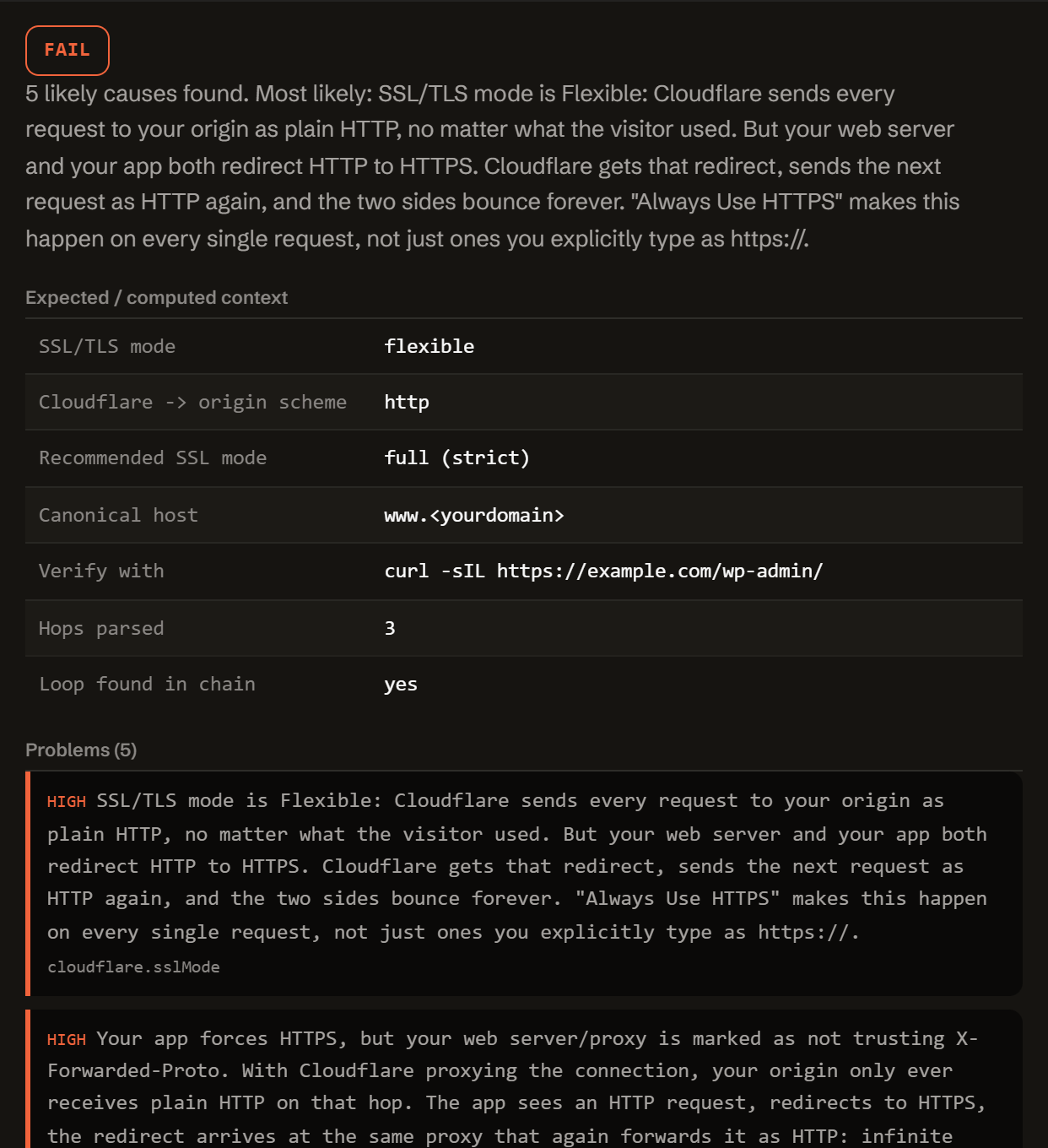
Three reasons two correct-looking rules cancel each other out.
A redirect loop is almost never one broken rule. It's two rules, in two different layers, each individually reasonable, disagreeing about the same request.
-
Cloudflare vs. origin.
Flexible SSL sends every request to your origin as plain HTTP. If your origin then redirects HTTP to HTTPS, Cloudflare sends the next request as HTTP again. Forever.
-
App vs. proxy header.
An app that forces HTTPS by checking its own connection's scheme, instead of the X-Forwarded-Proto header, always sees HTTP behind a proxy and always redirects.
-
Server vs. app canonical URL.
Your server redirects to www while WordPress's siteurl (or another app's base URL) points at the apex domain, or the two disagree on a trailing slash.
One function. Config in, diagnosis out.
No server, no API key, no signup. doctor-loop.js is plain JavaScript: read it, fork it, or run it in your own scripts or CI.
import { diagnose } from './doctor-loop.js';
// or, loaded globally: const { diagnose } = window.RedirectLoopDoctor;

const result = diagnose({
  url:        'https://example.com/',
  chain:      'HTTP/1.1 301 ...\nLocation: ...',
  cloudflare: { proxied, sslMode, alwaysHttps, pageRules },
  server:     { type, forcesHttps, trustsXForwardedProto, wwwRule },
  app:        { type, siteUrl, forcesHttps, trailingSlash },
});

// result
{
  "status":     "fail" | "warn" | "pass",
  "summary":    "…",
  "expected":   { sslMode, cloudflareToOriginScheme, recommendedSslMode, … },
  "problems":   [ { severity, code, message, path, value, fix } ],
  "fixes":      [ { title, value, where } ],
  "checklist":  [ "…" ],
  "disclaimer": "…"
}
Everything runs client-side. The form above calls this exact function in your browser. There is no backend, no API key, and this tool never fetches the URL you're diagnosing.
If you paste a chain, it parses every Location: header and URL, finds the first exact repeat, and diffs the two hops on either side of it to say precisely what's flipping: scheme, www vs. apex, or trailing slash. It also checks your Cloudflare/server/app settings directly for the usual structural causes, even without a chain.
Questions developers actually search for.
Straight answers to the same ERR_TOO_MANY_REDIRECTS questions this tool diagnoses, for when you just need the answer, not the checker.
What causes ERR_TOO_MANY_REDIRECTS?
Two or more layers in front of your site each redirect the request in a way the other layer immediately undoes: Cloudflare's SSL mode versus your origin's own HTTPS redirect, your server's www/apex or trailing-slash rule versus your app's own canonical URL, or your app forcing HTTPS without trusting the X-Forwarded-Proto header from whatever is proxying it. The browser gives up after roughly 20 hops and shows ERR_TOO_MANY_REDIRECTS.
Why does Cloudflare Flexible SSL create a redirect loop?
In Flexible mode, Cloudflare always sends the request to your origin as plain HTTP, regardless of what the visitor used. If your origin (web server or app) then redirects that HTTP request to HTTPS, Cloudflare sends the next request as HTTP again, and the two sides bounce forever. Cloudflare's own fix is to switch to Full or Full (strict) once your origin has a TLS certificate, rather than removing the origin's HTTPS redirect.
How do I fix a WordPress redirect loop behind Cloudflare?
Check three things: Cloudflare's SSL/TLS mode should be Full (strict), not Flexible, if your origin forces HTTPS; WordPress's own siteurl and home options (Settings > General, or WP_HOME/WP_SITEURL in wp-config.php) must use the same scheme and www/apex host your server already redirects to; and if WordPress is behind a proxy, wp-config.php needs to trust X-Forwarded-Proto so it doesn't redirect http-as-seen-by-PHP back to https forever.
Why does my app redirect to https in a loop behind a load balancer?
A load balancer or reverse proxy that terminates TLS forwards your app plain HTTP on the inside, even for an originally-HTTPS visit. If your app decides whether to force HTTPS by looking at its own connection's scheme (nginx's $scheme, Django's request.is_secure(), etc.) instead of the X-Forwarded-Proto header the proxy sets, it always sees http and always redirects, and the proxy always downgrades the next request back to http. Fix it by trusting X-Forwarded-Proto: SECURE_PROXY_SSL_HEADER in Django, TrustProxies in Laravel, HTTP_X_FORWARDED_PROTO in WordPress, config.force_ssl with trusted proxies in Rails.
How do I see the redirect chain?
Run curl -sIL https://your-url/ in a terminal: it prints every hop's status code and Location header until it stops or gives up. Paste that whole output into this tool's chain field. You can also open your browser's Network tab, reload with "Preserve log" on, and copy the sequence of requested URLs.
Does this tool fetch my site?
No. Everything runs in your browser as plain JavaScript. It never makes a network request to the URL you're diagnosing; it only reads the config fields and chain text you paste in and compares them against documented Cloudflare, nginx, WordPress, Laravel, Django, Rails, Vercel, and Netlify behaviour.
Free.
No account, no payment, no usage limit: it runs as a static page in your browser, so there is no server to bill for.
Tell me when a new tool lands. New tools only. No newsletter, no sharing. Reply to any mail to be removed.
Thanks. You will hear from us only when something new is live.
Could not save. Write to andrej@arling.sk.
Who publishes this and how it works.
- Publisher
- ARLing s. r. o., Ivanská cesta 32E, 821 04 Bratislava, Slovakia. Company number 56583486, VAT ID SK2122352100.
- Who makes it
- Written and maintained by one person in Bratislava. The source is public on GitHub.
- Payment and delivery
- Nothing is paid for and nothing is unlocked. The answer appears in the page as soon as the check runs.
- Sample and terms
- The tool opens with a worked example, so you can see a real result before you paste your own.
- Reply
- We answer andrej@arling.sk within 24 hours.
- What it is not
- We are not the vendor whose error you are chasing. The tool reads what you paste and names the rule; it changes nothing on your side.