Google OAuth Redirect DoctorTools for workARLing s. r. o., Bratislava
See why Google answers redirect_uri_mismatch.
Paste the redirect_uri from Google's error page, your Authorized redirect URIs, and your stack: NextAuth, Supabase, Firebase, Passport, Django, Laravel, Expo, Flutter, Postman, or gcloud. Get the one value that is different, byte for byte.
Diagnose yours Source code on GitHub
- Free
- Every check and every finding, with no account and no limit.
- Paid
- Nothing. This tool has no paid version and no sign-up.
- Limits
- 12 stacks covered, behind 108 automated tests.
- Your data
- Nothing leaves your browser. There is no backend of ours behind this page.
Three reasons Google keeps rejecting a URI that looks right.
Google's redirect_uri check is an exact string comparison. No wildcards, no normalization. These three causes account for almost every mismatch.
-
Exact match only.
Scheme, host, port, path, case, and trailing slash must all match. localhost and 127.0.0.1 count as different hosts. One differing character is enough to fail.
-
Wrong target.
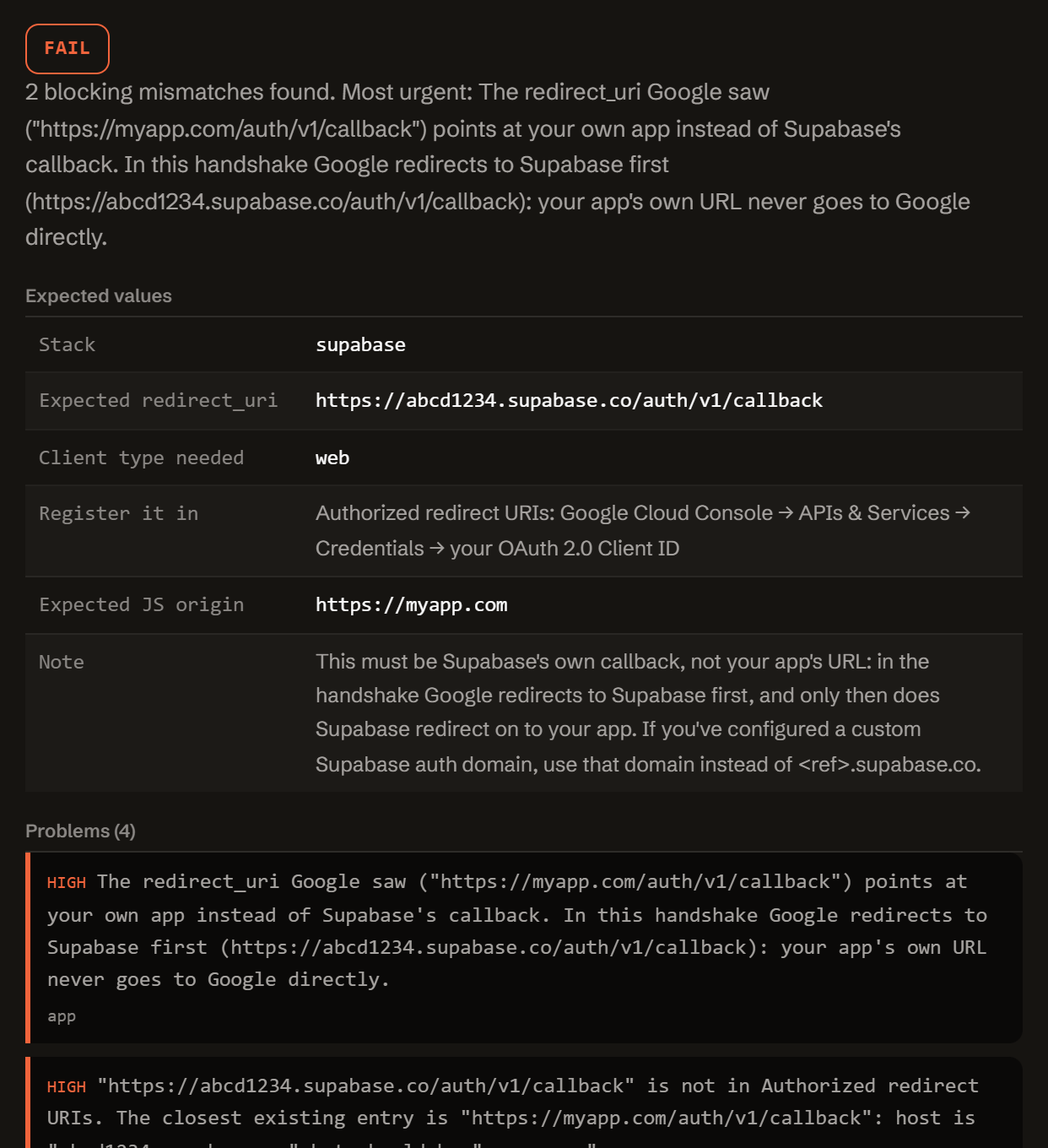
Supabase and Firebase need their own callback URL in Google Console, not your app's URL: Google redirects to them first. NextAuth and Auth.js need a specific /api/auth/callback/google path.
-
Wrong client type.
A Web application OAuth client only accepts http and https URIs. A custom scheme or a loopback port needs a Desktop, Android, or iOS client instead.
One function. Config in, diagnosis out.
No server, no API key, no signup. doctor-google.js is plain JavaScript: read it, fork it, or run it in your own scripts or CI.
import { diagnose } from './doctor-google.js';
// or, loaded globally: const { diagnose } = window.GoogleRedirectDoctor;

const result = diagnose({
  error:   { redirectUriFromError, clientType },
  console: { authorizedRedirectUris, authorizedJsOrigins, publishingStatus, savedMinutesAgo },
  app:     { stack, origin, callbackPath, supabaseRef, firebaseAuthDomain,
             expoUsername, expoSlug, useProxy, port, env },
});

// result
{
  "status":     "fail" | "warn" | "pass",
  "summary":    "…",
  "expected":   { stack, redirectUri, redirectUriNote, clientTypeExpected, … },
  "problems":   [ { severity, code, message, path, value, fix } ],
  "fixes":      [ { title, value, where } ],
  "checklist":  [ "…" ],
  "disclaimer": "…"
}
Everything runs client-side. The form above calls this exact function in your browser. There is no backend, no API key, and no request that carries your config anywhere.
It computes the redirect_uri your stack should send, diffs it byte for byte against what Google saw and against every entry in your Authorized redirect URIs, and reports which part differs: scheme, host, port, path, case, trailing slash, query, or fragment.
Questions developers actually search for.
Straight answers to the same redirect_uri_mismatch questions this tool diagnoses, for when you just need the answer, not the checker.
What does Error 400: redirect_uri_mismatch mean?
Google's OAuth server got a redirect_uri that is not byte-for-byte identical to one of the Authorized redirect URIs on your OAuth 2.0 Client ID. Google's docs are explicit: scheme, host, port, case, and trailing slash must all match. There is no wildcard matching, unlike Supabase's redirect allow-list. Either your app sends the wrong URI, or the right one is not registered yet.
Which redirect URI does NextAuth or Auth.js send to Google?
By default, your site's origin plus /api/auth/callback/google, for example https://myapp.com/api/auth/callback/google. This applies to NextAuth v4 and Auth.js v5, App Router and Pages Router alike. A custom basePath replaces /api/auth with your own prefix. Register that exact string, with no trailing slash, in Google Cloud Console.
What redirect URI do I put in Google Cloud Console for Supabase?
Supabase's own callback: https://<project-ref>.supabase.co/auth/v1/callback, or your custom Supabase auth domain if you set one. Never your app's URL. Google redirects to Supabase first, and only then does Supabase redirect to your app using its own separate Redirect URLs allow-list. Pasting your app's URL here instead is one of the most common causes of this error.
Why does localhost work but 127.0.0.1 does not, or the other way round?
Google treats localhost and 127.0.0.1 as two different hosts, even though both point at your machine. Its exact-match rule does not normalize them. If your code sends one and you registered the other, you will see this error. Register the exact host string your code actually sends.
Why do I still get redirect_uri_mismatch after adding the URI?
Three usual reasons. The value you added is not byte-identical to what your app sends (a stray trailing slash, http vs https, www vs apex, or a hidden character from pasting). You edited the wrong OAuth Client ID or the wrong Google Cloud project. Or the change has not propagated yet: Google's own guidance says it can take minutes up to a few hours.
Can I use a wildcard for Vercel preview deployments?
No. Unlike Supabase's redirect allow-list, Google's Authorized redirect URIs field accepts no wildcards. Every entry is an exact, literal string, and each Vercel preview gets its own *.vercel.app URL. Route the callback through a stable domain, even from previews, or register each preview URL individually.
Free.
No account, no payment, no usage limit: it runs as a static page in your browser, so there is no server to bill for.
Tell me when a new tool lands. New tools only. No newsletter, no sharing. Reply to any mail to be removed.
Thanks. You will hear from us only when something new is live.
Could not save. Write to andrej@arling.sk.
Who publishes this and how it works.
- Publisher
- ARLing s. r. o., Ivanská cesta 32E, 821 04 Bratislava, Slovakia. Company number 56583486, VAT ID SK2122352100.
- Who makes it
- Written and maintained by one person in Bratislava. The source is public on GitHub.
- Payment and delivery
- Nothing is paid for and nothing is unlocked. The answer appears in the page as soon as the check runs.
- Sample and terms
- The tool opens with a worked example, so you can see a real result before you paste your own.
- Reply
- We answer andrej@arling.sk within 24 hours.
- What it is not
- We are not the vendor whose error you are chasing. The tool reads what you paste and names the rule; it changes nothing on your side.