JWT DoctorTools for workARLing s. r. o., Bratislava
Paste the token and see exactly why it fails.
Paste a JWT and, optionally, the issuer/audience/algorithm you expect and the key to verify it against. Get the header and payload decoded, every RFC 7519/7515 rule checked, and the signature verified with your browser's own Web Crypto: HS256/384/512, RS256/384/512, PS256/384/512, ES256/384/512.
Diagnose yours Source code on GitHub
- Free
- Every check and every finding, with no account and no limit.
- Paid
- Nothing. This tool has no paid version and no sign-up.
- Limits
- 33 checks on RFC 7519 and RFC 7515, behind 104 automated tests.
- Your data
- Nothing leaves your browser. There is no backend of ours behind this page.
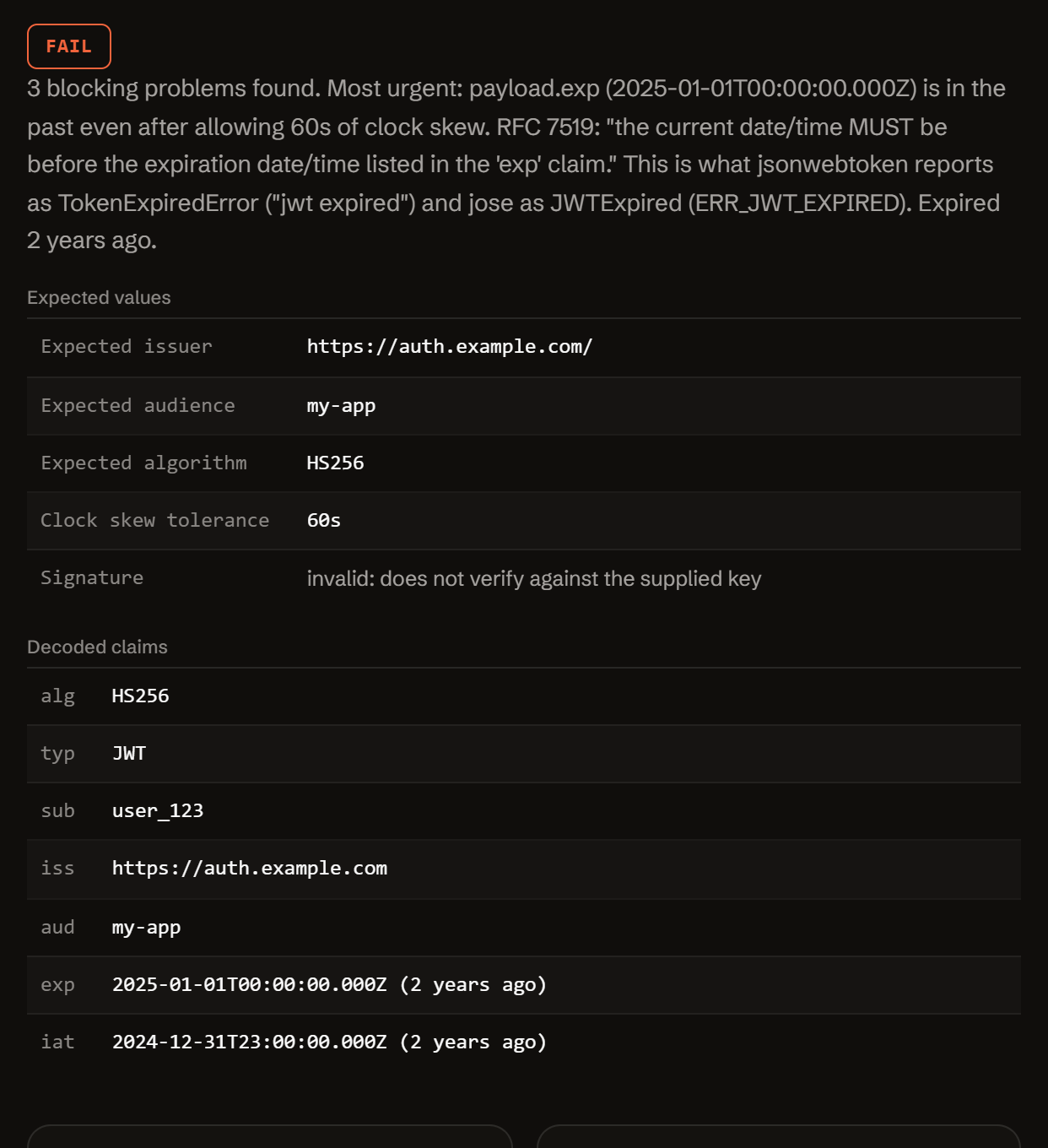
Paste the token. Get the decoded claims and the exact problem.
Decoding and signature verification both run in your browser: the token, the secret, and any key you paste never leave this page.
Three reasons a JWT that looks fine still fails to verify.
RFC 7519 and RFC 7515 define exactly what a valid, current, correctly-signed token looks like. Almost every real-world failure is one of these three.
-
Not three parts.
A JWT is header.payload.signature: exactly two dots, each part valid base64url JSON. Anything other than three dot-separated parts gets "jwt malformed" before verification even starts. A leftover "Bearer " prefix, wrapping quotes or a stray newline usually keep three parts but break the base64url decoding, and jsonwebtoken then reports "invalid token".
-
Wrong key, wrong algorithm.
alg: "none" means unsigned. A secret pasted where a public key belongs (or the reverse) can never verify. The token's own header.alg should never be trusted to pick the algorithm: that's how algorithm-confusion attacks work.
-
Clock, not code.
exp, nbf and iat are compared against the verifying server's own clock. A token that looks expired seconds after login is usually a clock-skew problem between two machines, not a short expiry.
One async function. Token in, decoded diagnosis out.
No server, no API key, no signup. doctor-jwt.js is plain JavaScript: read it, fork it, or run it in your own scripts or CI.
import { diagnose } from './doctor-jwt.js';
// or, loaded globally: const { diagnose } = window.JwtDoctor;

const result = await diagnose({
  token:    rawJwtString,
  expected: { issuer, audience, algorithm, clockSkewSeconds },
  key:      { type: 'none' | 'hmac-secret' | 'rsa-public-pem' | 'jwk', value },
});

// result
{
  "status":          "fail" | "warn" | "pass",
  "summary":         "…",
  "decoded":         { header, payload, signaturePresent },
  "signatureStatus": "valid" | "invalid" | "not_checked" | "unsigned" | "…",
  "expected":        { issuer, audience, algorithm, clockSkewSeconds },
  "problems":        [ { severity, code, message, path, value, fix } ],
  "fixes":           [ { title, value, where } ],
  "checklist":       [ "…" ],
  "disclaimer":      "…"
}
Everything runs client-side. The form above calls this exact function in your browser. There is no backend, no API key, and no request that carries your token, secret, or key anywhere.
It decodes the header and payload, checks structure against RFC 7515 and every timing/issuer/audience claim against RFC 7519, and, if you supply a key, verifies the signature through crypto.subtle for HS256/384/512, RS256/384/512, PS256/384/512 and ES256/384/512.
Free.
No account, no payment, no usage limit: it runs as a static page in your browser, so there is no server to bill for.
Tell me when a new tool lands. New tools only. No newsletter, no sharing. Reply to any mail to be removed.
Thanks. You will hear from us only when something new is live.
Could not save. Write to andrej@arling.sk.
Questions developers actually search for.
Straight answers to the same JWT questions this tool diagnoses, for when you just need the answer, not the checker.
What does "jwt malformed" mean?
The string you handed to jwt.verify() (or jose's jwtVerify()) is not a valid JWS Compact Serialization: RFC 7515 defines a JWT as exactly three base64url segments joined by two period characters, header.payload.signature. jsonwebtoken says "jwt malformed" only when the value does not split into exactly three parts at the periods: the word Bearer alone, a secret or the text null passed as the token, or a five-part JWE. When there are three parts but a segment is not valid base64url or not JSON, for example because a "Bearer " prefix, quotes or a line break came along, it says "invalid token" instead. Both are structural errors, checked before signature or claims.
Why do I get "invalid signature" although the secret is right?
The signature check is byte-exact over the header and payload segments as they were originally encoded, so the usual causes are: the secret or key you're verifying with does not match the one that actually signed it (a rotated Supabase JWT secret, an old copy in an environment variable, the wrong project's key); the token was re-encoded after signing (even reformatting whitespace inside the JSON before re-encoding changes the signed bytes); or a secret got used where a public key was needed, or the reverse. Confirm the current key first, byte for byte, before assuming the token itself is broken.
Why is my token expired right after login?
Usually a clock mismatch, not a short-lived token. RFC 7519 defines "exp" as a NumericDate compared against the verifying server's own clock, and explicitly allows "some small leeway" for clock skew; if the machine verifying the token is more than a few minutes ahead of the one that issued it (common on a VM, container, or a laptop that just woke up), a token minted seconds ago already looks expired. Set the clock skew tolerance above to a few minutes to test that theory, and check NTP sync on whichever server verifies tokens.
What is the difference between a secret and a public key for JWT verification?
An HMAC algorithm (HS256/HS384/HS512) uses one shared secret for both signing and verifying: whoever holds it can do either. An asymmetric algorithm (RS256/384/512, PS256/384/512, ES256/384/512) uses a private key to sign and a separate public key to verify; the public key can verify signatures but cannot create new valid ones. Pasting a public key where an HMAC secret is expected, or a shared secret where a public key is expected, cannot work, and is also the shape of a known "algorithm confusion" attack: a verifier must pin which algorithm and which kind of key it accepts, never trust the token's own header.alg to decide.
Is it safe to paste my token here?
Nothing you paste is sent anywhere: decoding is plain base64url + JSON.parse, and signature verification runs through your browser's own Web Crypto API (window.crypto.subtle), entirely client-side. There is no backend for this tool and no request that carries the token or key. As general hygiene, still avoid pasting a production secret into any tool including this one, and prefer rotating a secret you're unsure about over trusting it stayed private.
How do I verify a Supabase or Firebase JWT?
Supabase access tokens are HS256, signed with your project's JWT secret from Project Settings → API (or verified via its published JWKS on newer projects using asymmetric keys): paste that as an HMAC secret above. A Supabase anon or service_role key is itself a JWT but is a static project API key, not a user session; it decodes fine but verifying it just confirms the JWT secret, not a login. Firebase ID tokens are RS256, signed by Google and issued with iss "https://securetoken.google.com/<project-id>": verify them against Google's public keys at googleapis.com/robot/v1/metadata/x509/securetoken@system.gserviceaccount.com, selecting the key whose "kid" matches the token's header. A Firebase custom token (minted server-side, has a "uid" claim) is different again: it must be exchanged client-side via signInWithCustomToken() before you get a verifiable ID token.
Who publishes this and how it works.
- Publisher
- ARLing s. r. o., Ivanská cesta 32E, 821 04 Bratislava, Slovakia. Company number 56583486, VAT ID SK2122352100.
- Who makes it
- Written and maintained by one person in Bratislava. The source is public on GitHub.
- Payment and delivery
- Nothing is paid for and nothing is unlocked. The answer appears in the page as soon as the check runs.
- Sample and terms
- The tool opens with a worked example, so you can see a real result before you paste your own.
- Reply
- We answer andrej@arling.sk within 24 hours.
- What it is not
- We are not the vendor whose error you are chasing. The tool reads what you paste and names the rule; it changes nothing on your side.