Firebase Auth Domain DoctorTools for workARLing s. r. o., Bratislava
See why Firebase rejects your auth domain.
Paste your firebaseConfig's authDomain, the origin your app actually runs at, your Authentication → Settings → Authorized domains list, whether you call signInWithPopup or signInWithRedirect, where it's hosted, and your OAuth provider's console redirect URI. Get the exact mismatch and the exact fix.
Diagnose yours Source code on GitHub
- Free
- Every check and every finding, with no account and no limit.
- Paid
- Nothing. This tool has no paid version and no sign-up.
- Limits
- 8 rules checked, behind more than 100 automated tests.
- Your data
- Nothing leaves your browser. There is no backend of ours behind this page.
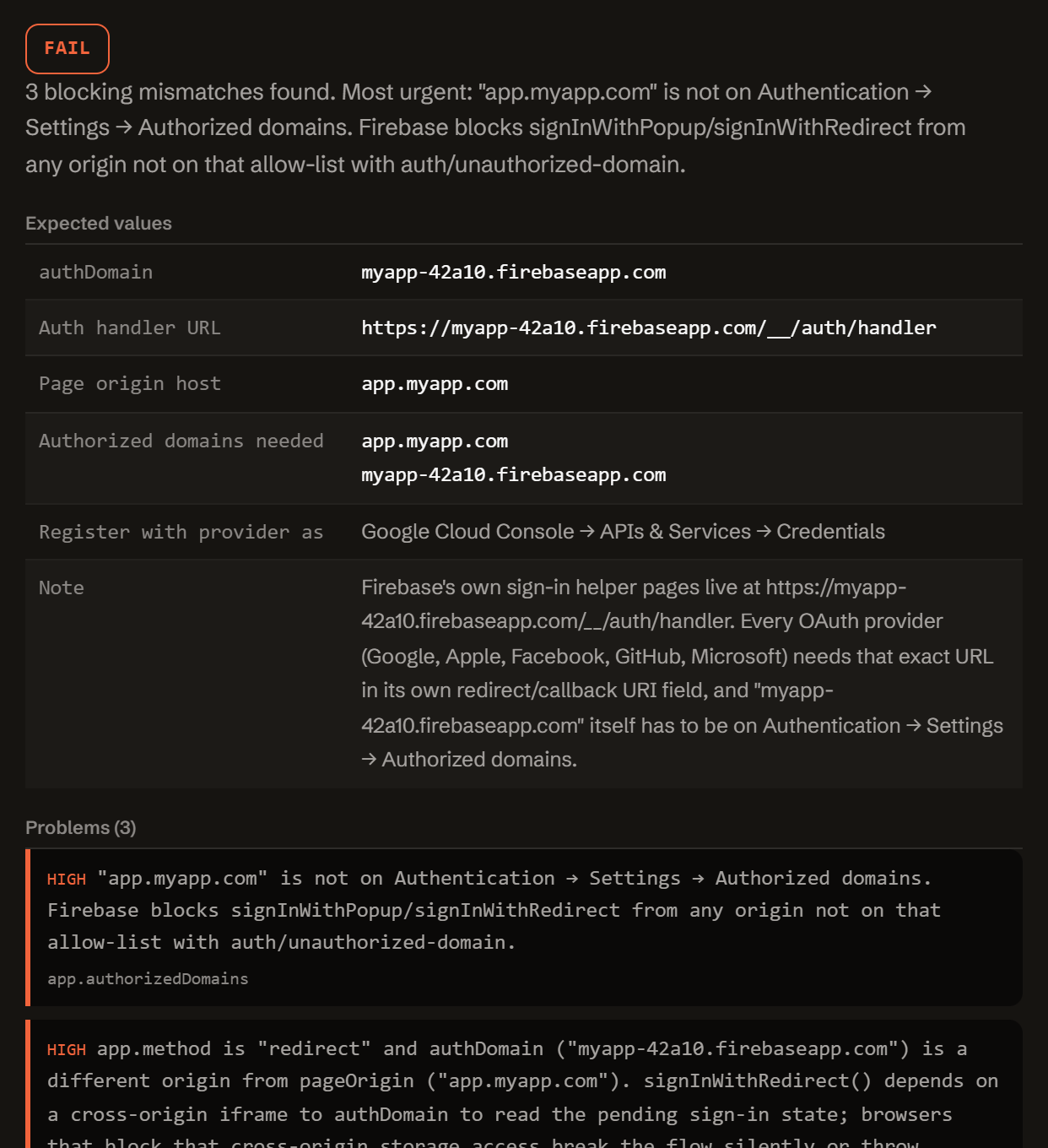
Three reasons Firebase Auth breaks even when your code looks right.
Firebase Authentication runs its own sign-in helper on authDomain, separate from your app's domain. Most redirect_uri-shaped bugs here trace back to one of these three.
-
Domain not authorized.
Your app's own host has to be on Authentication → Settings → Authorized domains, or every sign-in call throws auth/unauthorized-domain. localhost is included by default; a raw IP address never is.
-
Redirect crosses origins.
signInWithRedirect() relies on a cross-origin iframe to authDomain. Chrome, Firefox, and Safari all block that storage access by default now, so it fails silently or throws auth/missing-initial-state.
-
Provider console mismatch.
Every OAuth provider needs exactly https://<authDomain>/__/auth/handler as its redirect URI: not your app's own URL, and not close enough.
One function. Config in, diagnosis out.
No server, no API key, no signup. doctor-firebase.js is plain JavaScript: read it, fork it, or run it in your own scripts or CI.
import { diagnose } from './doctor-firebase.js';
// or, loaded globally: const { diagnose } = window.FirebaseAuthDoctor;

const result = diagnose({
  error:    { code },
  app:      { pageOrigin, authDomain, authorizedDomains,
             method, hosting, customAuthDomain,
             reverseProxyForAuthHandler, browser,
             thirdPartyCookiesBlocked },
  provider: { name, consoleRedirectUri },
});

// result
{
  "status":     "fail" | "warn" | "pass",
  "summary":    "…",
  "expected":   { authDomain, handlerUri, authorizedDomainsNeeded, … },
  "problems":   [ { severity, code, message, path, value, fix } ],
  "fixes":      [ { title, value, where } ],
  "checklist":  [ "…" ],
  "disclaimer": "…"
}
Everything runs client-side. The form above calls this exact function in your browser. There is no backend, no Firebase Admin SDK, and no request that carries your config anywhere.
It computes the auth handler URL Firebase expects (https://<authDomain>/__/auth/handler), checks your page origin against Authorized domains, checks a redirect flow against third-party cookie blocking, checks a custom authDomain against a reverse proxy, and diffs your provider console's redirect URI against the handler URL: then reports exactly which one is wrong.
Questions developers actually search for.
Straight answers to the same Firebase Auth questions this tool diagnoses, for when you just need the answer, not the checker.
What does auth/unauthorized-domain mean?
Firebase checked the origin your app is actually running on against Authentication → Settings → Authorized domains and did not find it there. signInWithPopup() and signInWithRedirect() both refuse to run from any origin that is not on that allow-list. localhost is included by default; a raw IP address is never accepted, only real hostnames.
Why does signInWithRedirect not work in Chrome or Safari anymore?
signInWithRedirect() depends on a cross-origin iframe to your authDomain to read the pending sign-in state once the provider sends the user back. Chrome M115+, Firefox 109+, and Safari 16.1+ all block that kind of cross-origin storage access by default now, so when authDomain is a different origin from your app, the redirect can fail silently or throw auth/missing-initial-state. signInWithPopup(), or an authDomain that shares your app's own origin, avoids that cross-origin dependency entirely.
What redirect URI do I put in the Google or Apple console for Firebase?
https://<authDomain>/__/auth/handler, where authDomain is exactly the value from your firebaseConfig (by default <project-id>.firebaseapp.com, or your own domain if you have set a custom authDomain). This is Firebase's own hosted sign-in helper page, not your app's URL, and it is the same field regardless of provider: Google Cloud Console, Apple's Services ID, Meta for Developers, GitHub OAuth Apps, or Microsoft Entra ID.
Should I use a custom authDomain?
It is one of Firebase's own documented fixes for the third-party-cookie problem: pointing authDomain at your own domain keeps the sign-in flow same-origin. It only works if you also set up a reverse proxy that transparently forwards every /__/auth/** request on that domain to <project-id>.firebaseapp.com; without the proxy, Firebase's sign-in helper pages simply do not exist at your domain and both popup and redirect flows break.
Why does it work on localhost but not on my domain?
Firebase includes localhost on Authorized domains automatically for every project, which is why local development usually just works. Your production or preview domain is never added automatically: it has to be added by hand on Authentication → Settings → Authorized domains, and every environment (production, staging, each preview URL) needs its own entry.
Does this tool touch my Firebase project?
No. It is a static page that runs one pure JavaScript function in your browser on the values you type. There is no backend, no Firebase Admin SDK, no API key, and no request that carries your configuration anywhere: read index.html and doctor-firebase.js directly to verify.
Free.
No account, no payment, no usage limit: it runs as a static page in your browser, so there is no server to bill for.
Tell me when a new tool lands. New tools only. No newsletter, no sharing. Reply to any mail to be removed.
Thanks. You will hear from us only when something new is live.
Could not save. Write to andrej@arling.sk.
Who publishes this and how it works.
- Publisher
- ARLing s. r. o., Ivanská cesta 32E, 821 04 Bratislava, Slovakia. Company number 56583486, VAT ID SK2122352100.
- Who makes it
- Written and maintained by one person in Bratislava. The source is public on GitHub.
- Payment and delivery
- Nothing is paid for and nothing is unlocked. The answer appears in the page as soon as the check runs.
- Sample and terms
- The tool opens with a worked example, so you can see a real result before you paste your own.
- Reply
- We answer andrej@arling.sk within 24 hours.
- What it is not
- We are not the vendor whose error you are chasing. The tool reads what you paste and names the rule; it changes nothing on your side.