A bank statementand a list of invoices.In a second you knowwho has not paid.
Upload a camt.053 statement (or its CSV) and paste your list of issued invoices. The tool matches them by VS (the Slovak payment reference) and by amount, suggests matches even without a VS, and shows what is overdue.
- 4 banks: Tatra banka, SLSP, VÚB, ČSOB
- 6 invoice formats: Pohoda, Omega, Money S3, SuperFaktúra, iDoklad, Fakturoid
- 178 automated tests
- 0 €, full tables on screen
- runs in your browser
Three things that most often cost time or go wrong when you match by hand.
Comparing a bank statement with a table of invoices line by line works, but with more invoices it is slow and error-prone.
-
Matching by hand takes hours.
Going through the statement line by line to find which payment belongs to which invoice is, with dozens of invoices a month, a whole afternoon of routine work where something easily slips through.
-
The VS gets typed wrong.
The client swaps a digit, drops the leading zero, or leaves the VS empty. Without a matching VS the payment today often just ends up in the “look it up later” pile.
-
Overpayments and instalments get lost.
When a client pays a different amount, or splits an invoice into two payments, matching by hand easily flags it as unpaid even though it has been settled.
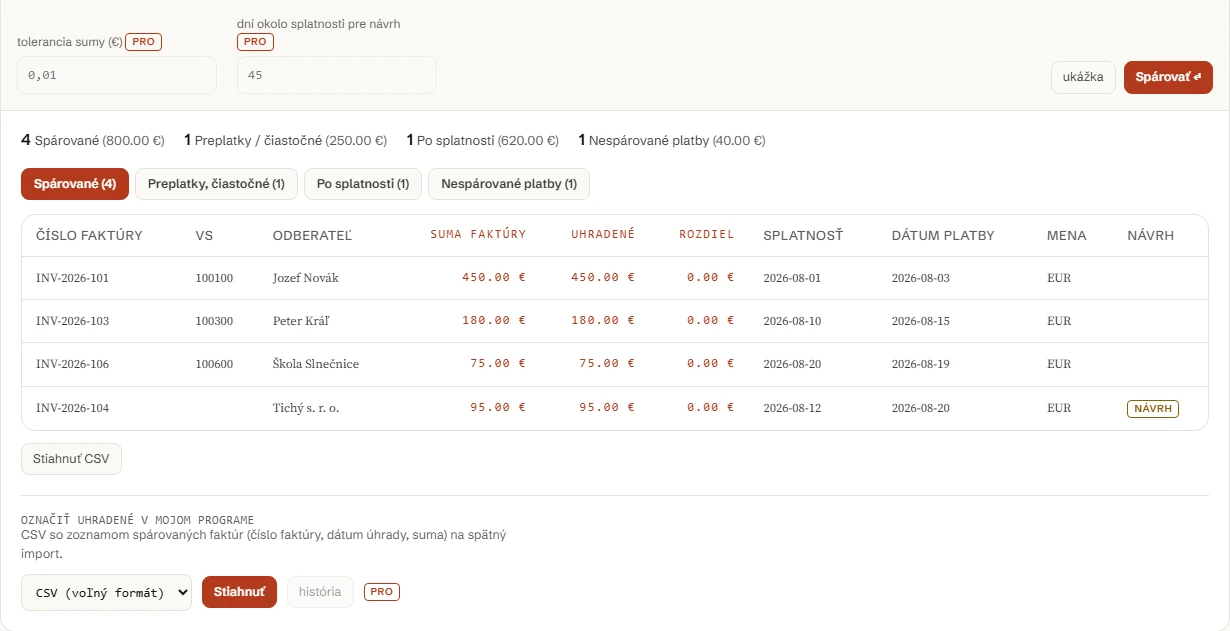
Paste the invoices, upload the statement. You get four lists.
Nothing you paste or upload is sent anywhere. The matching runs in your browser.
Upload a camt.053 XML statement, or a CSV export from camt053-to-excel.
A CSV with the list of matched invoices (invoice number, payment date, amount) for import back.
The tables on screen are complete and free, with no limit on the number of rows. Without a licence the downloaded file has the first 20 rows as a sample; the whole file is part of the licence.
Four functions. Invoices and a statement in, four lists out.
No server, no API key, no sign-up. parovac.js is plain JavaScript with no dependencies: read it, fork it, or run it in your own code or in CI.
import { parseInvoices, match, report, toCsv, MATCHED_COLUMNS,
         paymentsFromCamtRows } from '../parovac.js';
import { parse, toRows } from '../camt053.js';
// alebo globálne: const { parseInvoices, mapColumns, match, report, toCsv } = window.Parovac;

const invoices = parseInvoices(textZExcelu).invoices;
const payments = paymentsFromCamtRows(toRows(parse(camtXmlText)));

const result = match(invoices, payments, {
  tolerance: 0.01,       // EUR, default 0.01
  dateWindowDays: 45,    // default 45
});

const rep = report(result);
// rep.matched, rep.partial, rep.overdueInvoices, rep.unmatchedPayments, rep.markPaid, rep.summary

const csv = toCsv(rep.matched, { columns: MATCHED_COLUMNS });
Parsing the statement, parsing the invoices and the matching itself run exactly as the form above calls them, in your browser. There is no backend and no API key that could carry the contents of the statement or the invoices anywhere else.
Matching: a VS plus an amount that agrees within the tolerance counts as a match; the same VS with a different amount as a partial payment or an overpayment; without a matching VS the tool looks for a unique match by amount and by how close the date is to the due date and marks it as a suggestion; the rest stays unmatched. Payments with the same VS are added up before matching (instalments).
The header templates for Pohoda, Omega, Money S3, SuperFaktúra, iDoklad and Fakturoid are this page’s estimate based on common exports, not a verified specification from the vendors. If the tool gets a case wrong, report it as an issue on GitHub.
Pro for the accountant who does this every month.
The free version shows the full tables on screen, with no limit on the number of rows. Without a licence the downloaded file has the first 20 rows as a sample. Pro is convenience for repeated monthly work across several accounts, not unlocked matching.
-
Several statements and accounts at once.
Add more statements (for example from several bank accounts) and match them against the same list of invoices in one step.
-
Saved column mapping.
The column mapping for the regular monthly export from your accounting software is saved, and next time you only pick it.
-
Export for Pohoda, Omega or Money S3.
The list of matched invoices for marking as paid, in a format ready for your software, not just a generic CSV.
One licence for three tools. Pro for the Payment matcher is activated with the same licence as SEPA pain.001 Generator and camt.053 to Excel: €9 a month or €79 a year for all three, VAT included. Stripe processes the payment through Managed Payments; Link (Sold through Link, LLC) sends you the receipt and the invoice. SEPA pain.001 Doctor is free and needs no licence.
Payment through Stripe, VAT included, cancel any time. You get the licence key right after payment on the confirmation page.
Let me know about a new tool. New tools only. No newsletter, no sharing. Unsubscribe by replying to the email.
Thank you. We will only write when there is something new.
Could not save. Write to support@arling.sk.
Need this for a company? Bulk processing for several companies, API, support. Tell us what you need and we will reply within 24 hours.
Tell us what you needQuestions people actually search for.
Direct answers to questions about matching a bank statement with invoices.
What files do I need?
A bank statement as camt.053 XML (the default export to accounting in Tatra banka, SLSP, VÚB and ČSOB), or its CSV export from the sister tool camt.053 to Excel. And a list of issued invoices: text copied from Excel, or an uploaded CSV/TSV file, ideally with a header row (invoice number, VS, amount, due date, customer). An export from Pohoda, Omega, Money S3, SuperFaktúra, iDoklad or Fakturoid works, the columns are detected from the header row and can be reassigned by hand.
How does matching work without a VS?
When a payment has no VS matching any invoice, the tool tries to find an invoice with the same amount (within the tolerance) whose due date is at most 45 days from the payment date (adjustable in Pro). If such a match is the only one possible, that is, it is not ambiguous across several invoices or payments, it is offered as a suggestion for matching.
What are suggestions?
A suggestion is a match by amount and by closeness of date without a matching VS: less certain than a match through the VS, so the tool does not mark it as paid automatically. It appears in the Matched list marked “suggestion” and waits for manual confirmation, for example when the client typed the VS wrong on the payment.
Is any data sent?
No. Parsing the statement and the invoices and the matching itself all run in your browser, the tool has no backend. The only network activity is loading the page’s static files, an anonymous usage counter (Umami: only event names and counts, never the contents of the statement or the invoices) and your email, if you voluntarily sign up for news below.
How do I mark invoices as paid in my software?
The Matched list can be downloaded as a “mark as paid” CSV (invoice number, payment date, amount) for import back into your accounting software. Without a licence you get the first 20 rows as a sample in a generic CSV. With a licence the whole file, and on top of that a column format in the language of Pohoda, Omega or Money S3. Neither one is a verified import format straight from the vendor, only this page’s estimate, so check it before you import.
What is in Pro?
€9/month or €79/year adds several statements and accounts at once, saved column mapping, adjustable tolerances stored as a preset, an export ready for Pohoda, Omega or Money S3, and a history of previous matching runs. The matching itself and the full tables on screen stay free, with no limit on the number of rows; without a licence the downloaded file has the first 20 rows as a sample. See the Pro section.