CORS DoctorTools for workARLing s. r. o., Bratislava
See why the browser blocked your request.
Paste the error your browser console printed, what your front end actually sent (origin, method, headers, credentials), and the CORS headers your server sent back. Get the exact rule that's broken, byte for byte, plus a copy-paste header value or server snippet for Express, FastAPI, Django, Rails, Laravel, Go, .NET, Supabase, Firebase Functions, S3, or Cloudflare Workers.
Diagnose yours Source code on GitHub
- Free
- Every check and every finding, with no account and no limit.
- Paid
- Nothing. This tool has no paid version and no sign-up.
- Limits
- 11 stacks covered, behind 107 automated tests.
- Your data
- Nothing leaves your browser. There is no backend of ours behind this page.
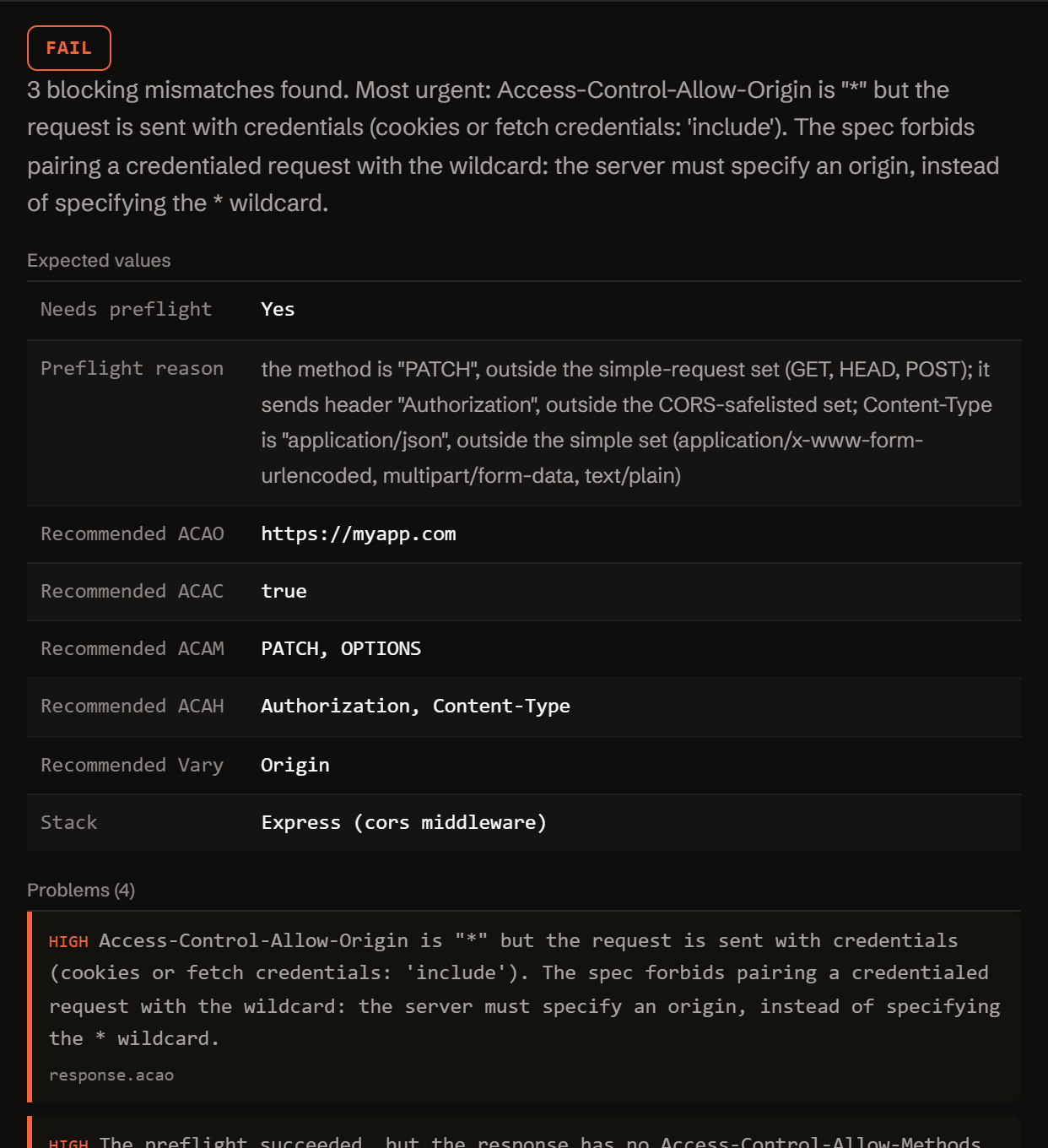
Fill in what your console, Network tab and server show. Get the exact diff.
Nothing you type or paste is sent anywhere. The check runs in your browser, against the documented CORS rules from MDN and the Fetch/WHATWG spec.
Three reasons your request keeps getting blocked.
CORS is enforced entirely by the browser, on the response headers it receives. These three causes account for almost every "blocked by CORS policy" error.
-
No permission header at all.
The server (or a proxy/CDN in front of it) never sent Access-Control-Allow-Origin. The browser blocks the response client-side, even when your API returned a real 200 with real data.
-
The wildcard doesn't work with cookies.
Access-Control-Allow-Origin: * can never be paired with credentials: 'include'. The spec requires the exact origin, plus Access-Control-Allow-Credentials: true, once cookies or an Authorization header are involved.
-
The preflight never gets a real answer.
A non-simple request (JSON body, custom header, PUT/DELETE) sends an OPTIONS first. If auth middleware or a catch-all router intercepts it before your CORS handler, the browser blocks the real request even though calling the route directly works fine.
One function. Config in, diagnosis out.
No server, no API key, no signup. doctor-cors.js is plain JavaScript: read it, fork it, or run it in your own scripts or CI.
import { diagnose } from './doctor-cors.js';
// or, loaded globally: const { diagnose } = window.CorsDoctor;

const result = diagnose({
  error:   { message },
  request: { pageOrigin, requestUrl, method, credentials,
             customHeaders, contentType },
  response: { acao, acac, acam, acah, vary, status,
              redirectsToOtherOrigin, preflightStatus },
  server:  { stack },
});

// result
{
  "status":     "fail" | "warn" | "pass",
  "summary":    "…",
  "expected":   { needsPreflight, acao, acac, acam, acah, vary, snippet, … },
  "problems":   [ { severity, code, message, path, value, fix } ],
  "fixes":      [ { title, value, where } ],
  "checklist":  [ "…" ],
  "disclaimer": "…"
}
Everything runs client-side. The form above calls this exact function in your browser. There is no backend, no API key, and no request that carries your config anywhere.
It works out whether your request needs a preflight, computes what Access-Control-Allow-Origin/Credentials/Methods/Headers should be, diffs that byte for byte against what you say the response actually sent, and (when nothing structured is filled in) falls back to pattern-matching the pasted console error text itself.
Free.
No account, no payment, no usage limit: it runs as a static page in your browser, so there is no server to bill for.
Tell me when a new tool lands. New tools only. No newsletter, no sharing. Reply to any mail to be removed.
Thanks. You will hear from us only when something new is live.
Could not save. Write to andrej@arling.sk.
Questions developers actually search for.
Straight answers to the same CORS questions this tool diagnoses, for when you just need the answer, not the checker.
What does "No Access-Control-Allow-Origin header is present" mean?
It means the response your browser received had no Access-Control-Allow-Origin header at all, so the browser refuses to hand the response body to your JavaScript, even though the server may have processed the request correctly and even returned a 200. Either the server never sends the header (no CORS middleware, or it isn't wired into this route), or something in front of it, a proxy, CDN, load balancer, or an error-handling middleware, strips it before the response reaches the browser. It is not a case of the value being wrong: there is no value at all.
Why does CORS fail only for POST with JSON or with an Authorization header?
Because that request stops being a "simple request" the moment it carries a header outside the CORS-safelisted set (Accept, Accept-Language, Content-Language, Content-Type) or a Content-Type other than application/x-www-form-urlencoded, multipart/form-data, or text/plain. application/json and an Authorization header both push it into preflight territory: the browser sends an OPTIONS request first, and if that response is missing, returns a non-2xx status, or its Access-Control-Allow-Methods / Access-Control-Allow-Headers don't list your method and header, the browser blocks the real request before it's even sent. A plain GET or a form-encoded POST never triggers this, which is why it can look like "POST is broken" when it's really "the preflight for this POST is broken".
Can I use Access-Control-Allow-Origin: * with credentials?
No. The Fetch/CORS spec forbids pairing the * wildcard with a credentialed request (cookies, or fetch with credentials: 'include'): when responding to a credentialed request, the server must specify an origin in Access-Control-Allow-Origin instead of specifying the * wildcard, and it must also send Access-Control-Allow-Credentials: true. If your request needs cookies or an Authorization header carried automatically, the server has to echo back the exact requesting origin (typically from an allow-list), not a wildcard, plus Vary: Origin so caches don't serve one origin's response to another.
Why does it work in Postman but not in the browser?
CORS is a browser-enforced restriction, not a server-enforced one. Postman, curl, and server-to-server calls never apply the same-origin policy or send a preflight OPTIONS request, so they see the real response regardless of what CORS headers are present. Only a page running in a browser, calling a different origin via fetch/XHR, triggers CORS checks and preflights. If Postman gets a clean 200, your server logic is fine: the fix is entirely about which response headers your server sends back to a browser-originated request.
How do I fix CORS on Express, FastAPI or Django?
Express: app.use(cors({ origin: 'https://your-frontend.example', credentials: true })) using the cors package, mounted before your routes and before any auth middleware. FastAPI: app.add_middleware(CORSMiddleware, allow_origins=[...], allow_credentials=True, allow_methods=[...], allow_headers=[...]), noting that allow_origins can't be ["*"] together with allow_credentials=True. Django: add corsheaders to INSTALLED_APPS, put corsheaders.middleware.CorsMiddleware as high as possible in MIDDLEWARE, and set CORS_ALLOWED_ORIGINS. In every case the exact origin (not a wildcard, if you use cookies) and the ordering of middleware relative to auth checks are what most setups get wrong. The diagnosis tool above generates the specific snippet for your values.
Does this tool call my server?
No. Everything you type or paste, the error text, your request details, the response headers, stays in your browser tab and is never sent anywhere. The diagnosis runs entirely client-side against the values you enter; it never makes a request to your API to check anything live. Read doctor-cors.js directly, or check your browser's Network tab while using the tool, to verify.
Who publishes this and how it works.
- Publisher
- ARLing s. r. o., Ivanská cesta 32E, 821 04 Bratislava, Slovakia. Company number 56583486, VAT ID SK2122352100.
- Who makes it
- Written and maintained by one person in Bratislava. The source is public on GitHub.
- Payment and delivery
- Nothing is paid for and nothing is unlocked. The answer appears in the page as soon as the check runs.
- Sample and terms
- The tool opens with a worked example, so you can see a real result before you paste your own.
- Reply
- We answer andrej@arling.sk within 24 hours.
- What it is not
- We are not the vendor whose error you are chasing. The tool reads what you paste and names the rule; it changes nothing on your side.