Cookie DoctorTools for workARLing s. r. o., Bratislava
See why the browser drops your cookie.
Paste the raw Set-Cookie header, your page and API origins, and how the request is made: fetch/XHR, an iframe, or a top-level navigation. Get the exact attribute, or the exact line of client code, that's dropping your session cookie: SameSite, Secure, Domain, Path, credentials mode, or third-party blocking.
Diagnose yours Source code on GitHub
- Free
- Every check and every finding, with no account and no limit.
- Paid
- Nothing. This tool has no paid version and no sign-up.
- Limits
- 27 rules checked for SameSite, Secure, Domain, Path and prefixes, behind 130 automated tests.
- Your data
- Nothing leaves your browser. There is no backend of ours behind this page.
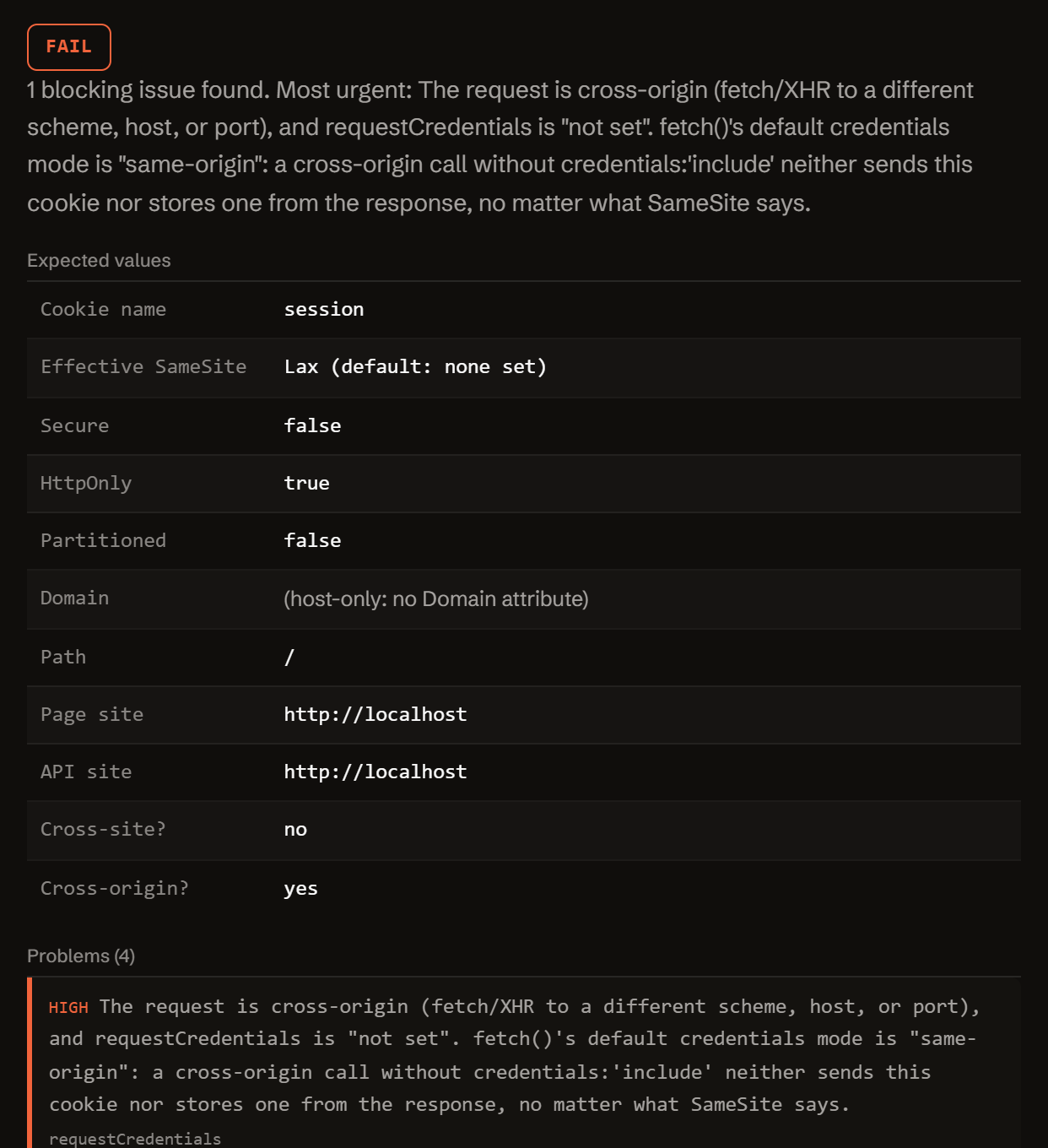
Paste the header and the request context. Get the exact diff.
Nothing you type is sent anywhere. The check runs in your browser, against the documented behavior of SameSite, Secure, Domain, Path, fetch credentials, CORS, and third-party cookie blocking.
Three reasons a Set-Cookie response never becomes a stored, sent cookie.
A React/Vite front end calling an API on another origin, a subdomain split between app and api, an embedded iframe, a Safari user: each breaks a cookie for a different reason. These three account for almost every "but the header is right there" bug.
-
SameSite=None needs Secure, and cross-site needs SameSite=None.
No Secure alongside SameSite=None and the browser rejects the cookie outright. A cross-site fetch, XHR, or iframe request with Lax, Strict, or no SameSite at all (default: Lax) never carries the cookie either.
-
Cross-origin fetch needs credentials:'include'.
Different port, different subdomain, or different scheme is enough. fetch's default credentials mode is 'same-origin': without credentials:'include', cookies are never sent or stored, no matter what SameSite says.
-
Domain has to be your host or its parent.
A cookie set by api.example.com with Domain=app.example.com, or with Domain=localhost, is rejected by the browser, not just scoped differently than you expected.
One function. Config in, diagnosis out.
No server, no API key, no signup. doctor-cookie.js is plain JavaScript: read it, fork it, or run it in your own scripts or CI.
import { diagnose } from './doctor-cookie.js';
// or, loaded globally: const { diagnose } = window.CookieDoctor;

const result = diagnose({
  setCookie:           'session=abc123; Path=/; SameSite=None',
  pageOrigin:          'https://app.example.com',
  apiOrigin:           'https://api.example.com',
  requestCredentials:  'include',  // 'omit' | 'same-origin' | 'include' | ''
  context:             'fetch-xhr', // 'top-level' | 'iframe' | 'fetch-xhr' | ''
  browser:             'chrome',    // 'chrome' | 'safari' | 'firefox' | ''
  proxyBehindHttps:    null,
});

// result
{
  "status":     "fail" | "warn" | "pass",
  "summary":    "…",
  "expected":   { cookie, page, api, isCrossSite, isCrossOrigin, correctedSetCookieLine, … },
  "problems":   [ { severity, code, message, path, value, fix } ],
  "fixes":      [ { title, value, where } ],
  "checklist":  [ "…" ],
  "disclaimer": "…"
}
Everything runs client-side. The form above calls this exact function in your browser. There is no backend, no API key, and no request that carries your cookie or origins anywhere.
It parses the Set-Cookie header attribute by attribute, computes whether your two origins are same-origin, same-site, or cross-site, applies SameSite's actual sending rules for the request context you specify, and checks Secure, Domain, Path, Expires/Max-Age, cookie-name prefixes, Partitioned, fetch credentials, and CORS against each other, in the order a real browser would reject them.
Free.
No account, no payment, no usage limit: it runs as a static page in your browser, so there is no server to bill for.
Tell me when a new tool lands. New tools only. No newsletter, no sharing. Reply to any mail to be removed.
Thanks. You will hear from us only when something new is live.
Could not save. Write to andrej@arling.sk.
Questions developers actually search for.
Straight answers to the same cookie questions this tool diagnoses, for when you just need the answer, not the checker.
Why is my cookie not set even though Set-Cookie is in the response?
The most common reasons: SameSite=None is set without Secure, so the browser rejects it outright; Secure is set but the response came over plain http (localhost is the only exemption, and Safari does not even grant that one); the Domain attribute names a host that is neither the responding server nor a parent of it (for example a response from api.example.com trying to set Domain=app.example.com); or a fetch/XHR call to a different origin used the default credentials mode instead of credentials:'include', so the browser never stored the Set-Cookie response in the first place.
What is the difference between same-site and same-origin?
Origin is scheme + host + port: https://app.example.com and https://api.example.com are different origins, and so are https://app.example.com and https://app.example.com:8443. Site is coarser: scheme plus the registrable domain (roughly, the domain suffix plus the label before it), ignoring subdomain and port. app.example.com and api.example.com are cross-origin but same-site. SameSite cookie rules only care about site; fetch's credentials mode and CORS care about origin, so a request can be same-site and still need credentials:'include'.
Do I need SameSite=None for localhost:3000 talking to localhost:8000?
No. Both are the host "localhost", so they are same-site regardless of port; SameSite=Lax or even Strict is fine. What trips people up is that they are still different origins (the port differs), so a cross-origin fetch/XHR call needs credentials:'include' (or xhr.withCredentials = true) and the API needs matching CORS headers, or the cookie will not be sent or stored even though SameSite was never the problem.
Why does it work in Chrome but not Safari?
Safari's Intelligent Tracking Prevention blocks or purges storage, including cookies, for a third party the user has not interacted with directly as a first party, independent of SameSite=None. A cookie set inside a cross-site iframe can work in Chrome (which mostly still allows it, though it is moving to partition or restrict it too) and still fail in Safari. There is no cookie attribute that opts back into third-party storage in Safari; the fix is routing the request through a first-party domain, using the Storage Access API, or not depending on a third-party cookie there at all.
Why is the cookie not sent with fetch?
fetch()'s default credentials mode is 'same-origin': for any cross-origin request (different scheme, host, or port) it neither sends existing cookies nor stores new ones from Set-Cookie, no matter what SameSite says. Add credentials:'include' (xhr.withCredentials = true for XMLHttpRequest). Once that is set, the API's CORS response also has to cooperate: Access-Control-Allow-Credentials: true and an exact Access-Control-Allow-Origin naming your page's origin, never a wildcard '*', which is incompatible with credentials.
Does this tool send my cookie anywhere?
No. Everything you type is parsed and diffed entirely in your browser; there is no backend and no request that carries your Set-Cookie value, session token, or origins anywhere. Read index.html and doctor-cookie.js directly to verify. The only network calls this page makes are to load itself and, if you use it, an anonymous page-view/event count sent to a self-hosted Umami instance that never receives what you typed. The "copy link" permalink also deliberately leaves the Set-Cookie value out of the URL.
Who publishes this and how it works.
- Publisher
- ARLing s. r. o., Ivanská cesta 32E, 821 04 Bratislava, Slovakia. Company number 56583486, VAT ID SK2122352100.
- Who makes it
- Written and maintained by one person in Bratislava. The source is public on GitHub.
- Payment and delivery
- Nothing is paid for and nothing is unlocked. The answer appears in the page as soon as the check runs.
- Sample and terms
- The tool opens with a worked example, so you can see a real result before you paste your own.
- Reply
- We answer andrej@arling.sk within 24 hours.
- What it is not
- We are not the vendor whose error you are chasing. The tool reads what you paste and names the rule; it changes nothing on your side.