Orbling for Shopify, by ARLing
Product page blocks built from your own catalog.
Choose a product, pick a look and see a free preview. AI suggests key specs and common questions, each with the exact text it came from. Nothing goes live until you publish.
Orbling Growth: 19.00 USD every 30 days after a 7‑day free trial, billed by Shopify. The preview is free.
Waiting for Shopify App Store approval, so it cannot be installed today.
Our other app, Agentic Product Check, is in the Shopify App Store: a read‑only check of your catalog, with a Free plan.
AI suggestions (2)
Accept all adds them to this page. Publish writes them to your store.
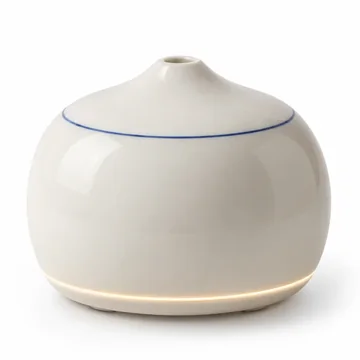
Porcelain Mist Diffuser
48.00 USD
- Diffusers
- Category
- glazed porcelain
- Material
What is the maximum runtime of the diffuser?+
Draft preview drawn by Orbling.
From your catalog to a published page.
Orbling builds one product page at a time. Your theme keeps its header, footer and layout; you place the blocks and save in the theme editor.
- Choose a productFrom your Shopify catalog. Nothing to import; up to 100 variants.
- Pick a lookNest, Halo or Torque. Orbling recommends one for the product's category.
- Build my pageA free draft from your catalog alone, without AI. It shows only in your theme editor, never to shoppers.
- Improve with AISuggestions for key specs, who the product suits and common questions. The first time, it starts the 7‑day free trial.
- Accept and publishCheck each source, select Accept all, then Publish. Add the Orbling blocks in the theme editor and save.
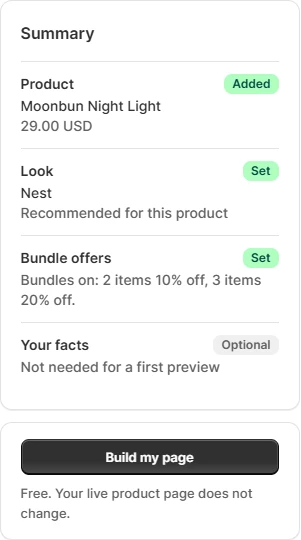
The summary before Build my page, on a sample product in our development store. For this test we set 3 items to 20% off.
Every suggestion shows its source.
Facts are taken word for word from your product data or from facts you confirmed. Other lines are rewritten by AI and pass an automatic check: numbers and materials must appear in the cited source, and superlatives or urgency are removed.
The rules also reject
- certificates not in the source
- reviews and ratings
- health claims
- anything about price, stock, delivery, returns or warranty
- Input
- The product title, category, up to 4,000 characters of plain description text and the facts you confirmed. Not prices, policies or buyer data as separate fields.
- Model
- Llama 3.3 70B on Cloudflare Workers AI.
- Limit
- Up to 20 AI runs per store per day (UTC), plus a daily capacity limit shared by all stores.
The checks are rules. They do not prove that your description is true, so read each source before you select Accept all.
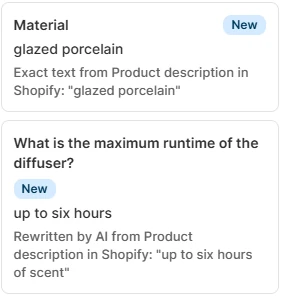
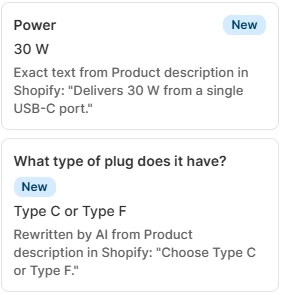
Real suggestion cards for two sample products on our development store, 6 November 2026, at their actual size.
Shoppers see it only after you publish.
A draft shows only in your theme editor, with a note that it is a draft. Publish writes the accepted content to Orbling's own fields on the product, and the blocks you placed show it on your store.
- Buy box
- Price, bundle cards for 1, 2 and 3 items, delivery and returns, and your store's payment methods. A missing detail is hidden, never filled in.
- Product story
- Key specs, who it suits, what is in the box and questions, below the product.
- Home
- A featured product on your home page.
- Orbling Look
- The colors, shape and type of the look you chose. You can limit it to the Orbling blocks.
Good to know: if you save an Orbling block in your theme before you publish, shoppers see your product's own details from Shopify in it, as with any theme change.
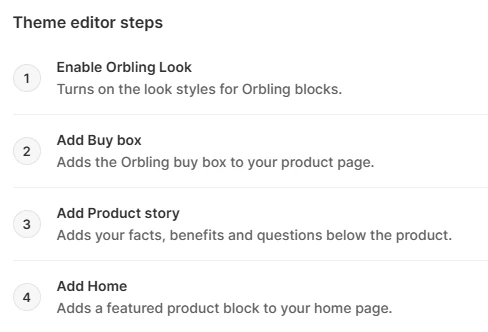
Theme setup in Orbling: each step opens the theme editor, where you place the block and save.
In Orbling, after Accept all
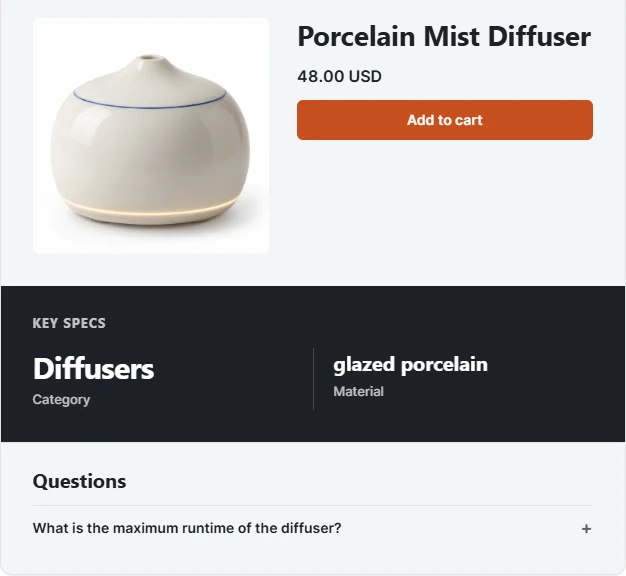
On the store after Publish, phone width
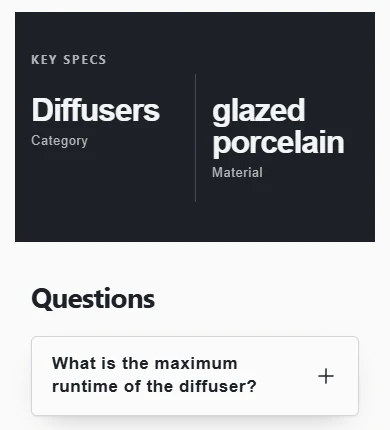
The same sample product on our development store, 6 November 2026. The store's header, footer and other products are cropped out.
Bundle offers for 2 and 3 items.
Orbling creates real Shopify automatic discounts for one product when you publish. By default 2 items get 10% off and 3 items 15% off; you can change the amounts or turn bundles off.
- Above your costsEach variant's price after the discount must stay above the cost plus shipping per item you enter.
- No stackingBundle discounts do not combine with other discounts.
- Turned off by itselfIf a price or discount changes in Shopify so the saving no longer holds, Orbling turns the saving off.
- Off at any timeTurn off bundle discounts removes the product's discounts and keeps your content. It works without a plan.
- Before you uninstallTurn the discounts off first: after uninstalling, Orbling can no longer change your store.
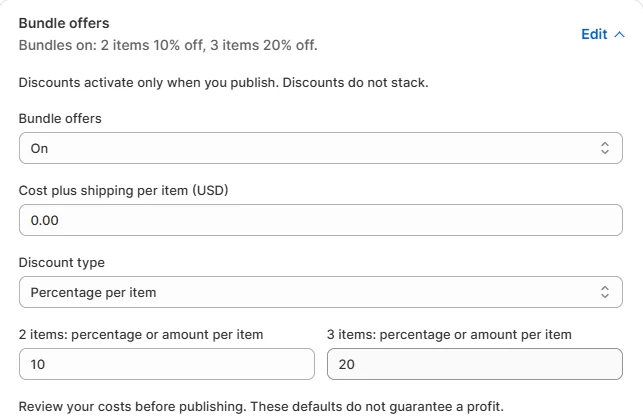
The Bundle offers panel in Orbling. For this test we set 3 items to 20%. The panel itself says the defaults do not guarantee a profit.
The Bundle offers panel in Orbling with its default values, redrawn in HTML with the app's text word for word. The panel itself says the defaults do not guarantee a profit.
One plan, one price.
Once Orbling is in the Shopify App Store, the plan is 19.00 USD every 30 days after a 7‑day free trial. No usage or other app charges. Shopify bills the plan on your Shopify invoice.
- Free, without a plan
- Choose a product, pick a look, Build my page, the draft in your theme editor, and turning off Orbling discounts.
- With the trial or plan
- Improve with AI and Publish.
- Free trial
- 7 days, once per store while Orbling holds its data. Nothing is charged during the trial.
- Orbling Growth
- 19.00 USD every 30 days. Shopify may show an estimate in your store currency.
- Cancel
- Anytime on the Plan page. Uninstalling stops future charges; charges already submitted may remain on your Shopify invoice.
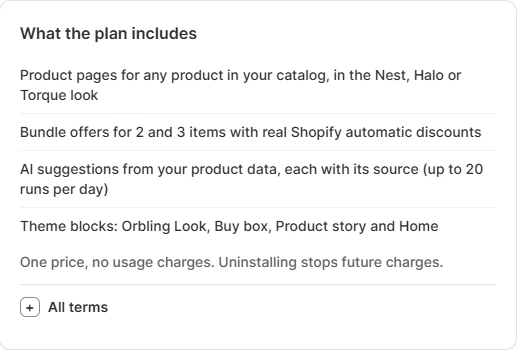
The Plan page in Orbling after a test subscription on our development store. The terms there match this page.
What Orbling does not do.
It does not build your whole store. No header, footer, menus, collections, pages, policies or domain.
It does not edit your product details. Titles, descriptions, images, prices and variants stay as they are. Publish writes only Orbling's own product fields, plus Shopify discounts when bundles are on.
It does not edit theme files. It asks for no theme permissions; you place the blocks.
It works only with themes that support app blocks.
It adds no reviews, ratings, countdowns or compare‑at prices.
It does not count sales yet. The Revenue screen stays empty until Shopify approves access to protected customer data and order webhooks are on.
It is in English only. The app and support are in English, and it does not translate.
Your data.
- Where
- Cloudflare Workers, D1 and Workers AI.
- Permissions
- Six, none for your theme code.
- On your store
- The Orbling blocks set no cookies and send nothing to our servers.
- Buyers
- No buyer names or contact details are stored.
- Removal
- Uninstalling removes access; store data is deleted when Shopify sends its erasure request 48 hours later, except a few records the privacy policy lists with their own retention.
Questions about Orbling.
Can I install Orbling today?
No. Orbling is not in the Shopify App Store yet. It is waiting for Shopify approval, so there is no public listing to install from. This page will link to the listing once Orbling is in the Shopify App Store. Our other app, Agentic Product Check, is in the Shopify App Store today.
Does the free preview change my live store?
No. Build my page saves a draft that your theme shows only inside the theme editor, with a note that it is a draft. Shoppers see Orbling content only after you select Publish. If you turn on the Orbling Look app embed or save an Orbling block before that, the change is live in your theme right away, as with any theme change.
Why is it called AI Store Builder if it does not build my whole store?
Orbling: AI Store Builder is the app's name in Shopify. For the products you choose, it builds page blocks from your catalog and confirmed facts, a look for those blocks and bundle offers for 2 and 3 items. It does not create your header, footer, menus, collections, pages, policies or domain.
Does Orbling work with my theme?
Your theme must support app blocks. Orbling does not edit theme files: you place the blocks from the links on Theme setup and save in Shopify. By default the Orbling Look embed applies the look's colors, shape and type to your whole theme while the header, footer and layout stay; you can turn that off in the embed settings.
What does the AI receive, and where does it run?
Cloudflare Workers AI (Llama 3.3 70B) receives our instructions, the facts you confirmed with their sources, the product title, category and up to 4,000 characters of plain text from the product description. It does not receive prices, policies, the store domain, order or buyer data as separate fields. Avoid personal data in the text you supply.
How much does it cost, and how do I cancel?
19.00 USD every 30 days after a 7-day free trial, one trial per store while Orbling holds its data, with no usage or other app charges. Cancel anytime on the Plan page. Cancelling or uninstalling stops future charges; charges already submitted may remain on your Shopify invoice.
Who answers support questions?
Write to support@arling.sk in English. Replies come from an AI assistant run by ARLing, and support cannot change anything in your store. We do not promise a response time yet.
Orbling is not in the Shopify App Store yet.
Until then, the setup guide shows every step and button, and the privacy policy says what the app reads and stores.
Meanwhile, check your catalog with Agentic Product CheckOur read‑only app in the Shopify App Store, with a Free plan.
Who builds Orbling.
- Company
- ARLing s. r. o., Ivanská cesta 19112/32E, 821 04 Bratislava, Slovakia. Company ID 56 583 486.
- Billing
- Through Shopify, on your Shopify invoice.
- Support
- support@arling.sk, in English, answered by an AI assistant run by ARLing.
- Other apps
- Agentic Product Check, our read‑only catalog check, is in the Shopify App Store.
I run ARLing on my own, with AI helping with code and text.